
 Add to Chrome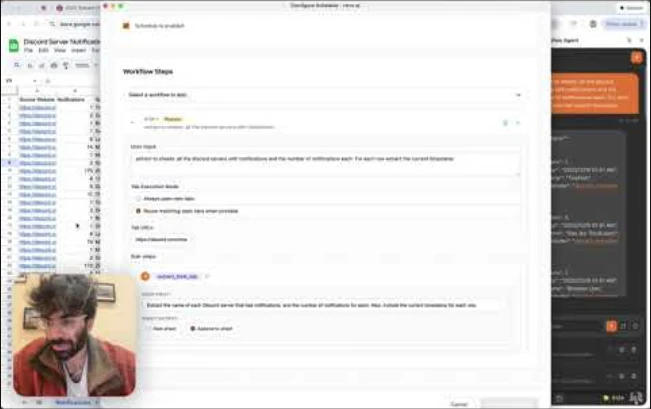
Turn any successful workflow into a scheduled task that runs on autopilot. Schedule from the Chrome Extension for local execution using your logged-in sessions, or export to Cloud for 24/7 headless operation. Perfect for price tracking, inventory monitoring, job board scraping, news aggregation, and competitive analysis.
Creating a Schedule
- 01
Run a task successfully in the chat
- 02
Click "Schedule" on the agent's response
- 03
Set a title and choose frequency: once, hourly, daily, weekly, or custom cron
- 04
Pick your start time and configure advanced options
- 05
Save — your schedule is now active
Browser Execution (Chrome Extension)
Scheduled tasks run in your Chrome browser using your existing logged-in sessions — no re-authentication required. Tasks execute while your browser is open. If a scheduled run is missed (browser closed), it runs automatically when Chrome reopens.
Schedule set for 9 AM → Browser closed overnight → Opens at 10 AM → Task runs immediatelySmart Tab Reuse
Configure schedules to reuse matching open tabs instead of opening new ones. This can reduce sign-in churn on authenticated sites where the session is still valid.
- 01
In Schedule Config, find "Tab Execution Mode"
- 02
Select "Reuse matching open tabs when possible"
- 03
Keep your target site open in a tab
- 04
The agent uses your existing logged-in session
Auto-Append to Sheets
Build a master tracking sheet that grows over time. Configure your schedule to append new data as rows to the same Google Sheet instead of creating a new sheet each run.
- 01
In Schedule Config, expand the workflow step
- 02
Find "Sheet Output Configuration"
- 03
Select "Append to same sheet on each run"
- 04
Each scheduled run adds new rows to your master sheet
Daily job scrape → New listings append as rows → One sheet tracks all jobs over timeMulti-Step Workflows
Chain multiple workflows together in a single schedule. Each step can have its own tab handling and sheet configuration. Steps can pass context using "Reuse tabs from previous step."
Step 1: Scrape job listings → Step 2: Analyze fit with resume → Step 3: Export to tracking sheetCloud Scheduling (24/7)
Cloud schedules run on rtrvr.ai's headless cloud browsers, so they keep going when your laptop is closed. They live in the Cloud dashboard (Cloud → Schedules), repeat every N minutes, hours or days (or run once), can write into the same Google Sheet, Doc or Slides deck on every run, and can notify you when a run finishes.
Creating a Cloud Schedule
- 01
From the dashboard: open Cloud → Schedules, click New Schedule, choose what to run on the Workflow tab, then set the frequency, start time, time zone and notifications.
- 02
From a cloud chat: ask the cloud agent to repeat the task, e.g. "check these prices every morning". The agent schedules the run it is working on (its
rtrvr.schedulestep). The schedule is created only if that run succeeds, then replays the run at the frequency you asked for. It appears in Cloud → Schedules under the name the agent gave it.
A cloud schedule runs one of three targets, chosen on the Workflow tab of the Schedule modal (Cloud → Schedules): a saved execution (replay a completed cloud run — the default), a prompt (up to 4,000 characters, with up to 20 optional start URLs), or tools (1–10 of your saved custom/MCP tools, run in order with the parameters you fill in). The dashboard sends that choice to the createSchedule / updateSchedule callables as a target object; a request with only sourceExecutionId still means the execution kind. Those callables need a signed-in rtrvr.ai session, not an API key. There is no REST endpoint for creating or changing schedules.
// target: prompt
{
  "name": "Daily price check",
  "target": {
    "kind": "prompt",
    "userInput": "Open each competitor's pricing page and summarize what changed since the last run",
    "urls": ["https://example.com/pricing"]
  },
  "frequency": { "unit": "days", "every": 1 },
  "timeZone": "America/New_York"
}

// target: tools (ordered saved-tool steps)
{
  "name": "Sync leads to Slack",
  "target": {
    "kind": "tools",
    "steps": [
      { "toolName": "fetchNewLeads", "parameters": { "since": "24h" } },
      { "toolName": "postLeadsToSlack" }
    ]
  },
  "frequency": { "unit": "hours", "every": 6 }
}

// target: execution (replay a completed cloud run)
{ "target": { "kind": "execution", "sourceExecutionId": "exec_123" } }
Frequency
A cloud schedule repeats at a fixed interval from its start time, in the schedule's time zone (an IANA name such as America/New_York; UTC by default). Cloud schedules do not take cron expressions: the start time sets the time of day, and the interval sets how often it repeats.
| Dashboard option | Frequency |
|---|---|
| Every 15 minutes | { "unit": "minutes", "every": 15 } |
| Every 6 hours | { "unit": "hours", "every": 6 } |
| Daily | { "unit": "days", "every": 1 }, at the start time |
| Weekly | { "unit": "days", "every": 7 }, on the start day |
| One-time | { "unit": "once" }, at the start time (right away if that time has passed) |
Notifications
The Notifications tab sends every finished run, successful or not, to email, Slack, Discord, a WhatsApp number linked to your account, or your own webhook. The webhook gets the same payload as an /agent completion callback, signed if you set a secret. See Webhooks.
Extension schedule delivery & alerts
Extension schedules can deliver each run too. When a run finishes, the extension hands it to rtrvr.ai, which sends it to the schedule's channels — webhook, WhatsApp, email, Slack or Discord — trying each one up to 3 times. Set it up from Delivery & alerts (the bell on the schedule in the side panel or in Cloud → Schedules → Extension), or just ask in chat: "check prices every morning and WhatsApp me the results", "send my daily digest to https://… with no notifications".
- 01
Chrome notification on this computer: *Every run*, *Only if something fails*, or *Never*. Once any channel is on it defaults to *Only if something fails*: the notification appears only when the run fails or a delivery still fails after 3 tries. Either way, new runs show as a count on the Schedules button in the side panel until you open it.
- 02
Webhooks must be public
https://URLs, because delivery goes out from rtrvr.ai. For a local n8n or server, expose it withn8n start --tunnelor ngrok and use that URL. - 03
Payload: the same envelope as a cloud schedule's webhook (
rtrvr.execution.succeeded/rtrvr.execution.failed), plusdata.schedule(id,title,runId,deviceId,source: "extension") and a one-linedata.summary. With a secret set, requests carryX-Rtrvr-Signature: t=<unix seconds>,v1=<hex HMAC-SHA256 of t.body>. - 04
Send test in the settings posts a sample run to every channel that is on, so you can check your receiver before the next run.
- 05
Needs extension 37.9.1 or later. If the computer can't reach rtrvr.ai after a run, it shows the notification instead (unless notifications are set to *Never*).
Schedule Management
Manage extension schedules from the Schedules dropdown in the extension side panel. Manage cloud schedules in Cloud → Schedules: each card can be edited, paused or resumed, run now, or deleted, and its menu can skip the next run, cancel a run in progress, open the last run, or show the Run History.
Run a Cloud Schedule Now
Run Now in a schedule card's menu starts a one-off run of the schedule's target a few seconds later, without moving the next scheduled time. If a run of that schedule is still going and its Concurrency Policy isn't Allow overlap, the manual run is recorded as skipped. Force Run Now starts it anyway. Manual runs show in the Run History next to scheduled ones.
Reading Results
- 01
Cloud schedules: Run History in the schedule card's menu lists each run's status, duration, credits used, summary and error, with a link to the full run. To have results sent to you instead, turn on a notification channel.
- 02
From a cloud chat: ask the agent, e.g. "what did my price check find this week?". It reads your cloud schedules and their recent runs.
- 03
Over MCP / REST (API key):
listwithkind: "schedules"returns your cloud schedules and the schedules your extension devices have synced to rtrvr.ai. Each item hassource: "cloud"orsource: "extension". Cloud items includeid,name,status,frequency,nextRunAt,lastRunAtandlastRunStatus. - 04
check_resultswithkind: "schedules"answers a question about those schedules' recent runs. It also returns them asschedules. Each cloud entry lists its recentruns, withstatus,scheduledFor,startedAt,finishedAt,summary,errorMessage,creditsUsedandexecutionId. Both tools work while Chrome is closed. - 05
Narrowing:
idpicks one schedule: a cloud schedule's ID or name, or an extension schedule's title (a name only has to contain the text).limitsets how many recent runs to read per schedule (default 10, up to 100 for cloud schedules).source: "cloud"orsource: "extension"reads only one kind.device_idnarrows extension schedules only.
curl -X POST "https://mcp.rtrvr.ai" \
  -H "Authorization: Bearer rtrvr_your_api_key" \
  -H "Content-Type: application/json" \
  -d '{
    "tool": "check_results",
    "params": {
      "kind": "schedules",
      "source": "cloud",
      "id": "Daily price check",
      "user_input": "Which prices changed since yesterday?",
      "limit": 5
    }
  }'
The response (shortened):
{
  "success": true,
  "kind": "schedules",
  "query": "Which prices changed since yesterday?",
  "answer": "Daily price check (cloud): 2 prices changed since yesterday...",
  "itemsConsidered": 1,
  "schedules": [
    {
      "source": "cloud",
      "id": "8Xk2...",
      "name": "Daily price check",
      "status": "active",
      "frequency": { "unit": "days", "every": 1 },
      "nextRunAt": "2026-09-18T15:00:00.000Z",
      "lastRunStatus": "success",
      "runs": [
        {
          "runId": "8Xk2..._1789657200000",
          "status": "success",
          "scheduledFor": "2026-09-17T15:00:00.000Z",
          "startedAt": "2026-09-17T15:00:04.000Z",
          "finishedAt": "2026-09-17T15:02:10.000Z",
          "summary": "2 of 14 prices changed...",
          "errorMessage": null,
          "creditsUsed": 12,
          "executionId": "8Xk2..._1789657200000"
        }
      ]
    }
  ]
}Start a Scheduled Prompt from Another System
A schedule can't be called over HTTP, but its prompt can. Create a prompt trigger with the same text, and Zapier, Make, n8n, a CRM or your own backend can run that prompt whenever it needs to, separately from the schedule's own timing.
- 01
Open Cloud → Triggers and click New Trigger
- 02
In the target list choose Write a prompt…, paste the prompt your schedule runs, and add its start URLs if it has any
- 03
Optionally set a result webhook URL, then click Create Trigger and copy the trigger URL from the table
- 04
POST to that URL with an API key that has cloud agent access
curl -X POST "https://mcp.rtrvr.ai/v1/webhooks/trigger/YOUR_TRIGGER_ID" \
  -H "Authorization: Bearer rtrvr_your_api_key" \
  -H "Content-Type: application/json" \
  -d '{
    "input": "Only report products whose price changed by more than 5%",
    "webhookUrl": "https://your-app.com/rtrvr/price-check"
}'- 01
The stored prompt always runs as written.
inputis optional; it is added after the prompt as extra instructions and never replaces it. - 02
urls(optional) replaces the trigger's stored start URLs for that call. - 03
webhookUrl(HTTPS only) receives the run's result when it finishes; addwebhookSecretto have the payload signed. Without awebhookUrl, the result webhook saved on the trigger is used, if there is one. - 04
If the run finishes within about 25 seconds, the response contains its result (HTTP 200). Otherwise the call returns HTTP 202 with a
trajectoryId. The run keeps going, and its result goes to the webhook and shows in your Cloud executions. - 05
Errors: 403 when the API key has no cloud agent access, 404 when the trigger does not belong to the key's account, 400 for a non-HTTPS webhook URL.
// HTTP 202 — the run is still going
{
  "success": true,
  "status": "accepted",
  "trigger": {
    "id": "YOUR_TRIGGER_ID",
    "name": "Price check",
    "targetType": "prompt",
    "toolName": null,
    "taskId": null,
    "promptPreview": "Open each competitor's pricing page and summarize what changed since the last run"
  },
  "trajectoryId": "5f0c1c9e-2b7a-4d4e-9a57-0c3f2b8d1e44",
  "message": "The cloud run started and is still executing. ...",
  "requestId": "...",
  "timestamp": "2026-09-16T09:00:04.512Z"
}Error Handling
- 01
Every cloud run's outcome (success, error, timed out, cancelled or skipped) and its error message are kept in the schedule's Run History
- 02
If a schedule's target can no longer run (for example, its saved tool was deleted), that run is recorded as an error and the schedule pauses with the reason on its card. Fix the target, then resume.
- 03
Notifications fire for failed runs too, so a broken schedule reports on the same channel as a working one
- 04
When a run is due while the previous one is still going, the schedule's Concurrency Policy decides: Queue latest (the default) runs only the latest missed occurrence once the current run ends, Skip if running drops it, and Allow overlap runs both
Best Practices
- 01
Test schedules with a one-time execution before enabling recurring runs
- 02
Use tab reuse for authenticated sites to avoid login walls
- 03
Use sheet append mode to build historical datasets over time
- 04
Set appropriate intervals — don't overwhelm target sites
- 05
Use webhooks for real-time notifications on completion
- 06
Check a schedule's Run History regularly to catch failures and slow runs early
- 07
Consider timezone differences for global operations
Platform Availability
| Capability | Extension | Cloud | API key (REST / MCP) |
|---|---|---|---|
| Create schedules from chat | ✅ | ✅ | MCP schedule tool (extension schedule on a connected device) |
| Edit, pause, resume, delete | ✅ side panel | ✅ dashboard | — |
| Run on demand | — | ✅ Run Now | A prompt trigger runs the same prompt (a separate run) |
| Local browser execution | ✅ | — | — |
| Smart tab reuse | ✅ | — | — |
| 24/7 headless execution | — | ✅ | — |
| Auto-append to sheets | ✅ | ✅ | — |
| Multi-step workflows | ✅ | ✅ | — |
| Email / Slack / Discord / WhatsApp / webhook notifications | ✅ sent via rtrvr.ai | ✅ | — |
| Read results | ✅ side panel | ✅ Run History | list / check_results (cloud and extension schedules) |
| Missed-run catch-up | ✅ | — | — |