
 Add to Chrome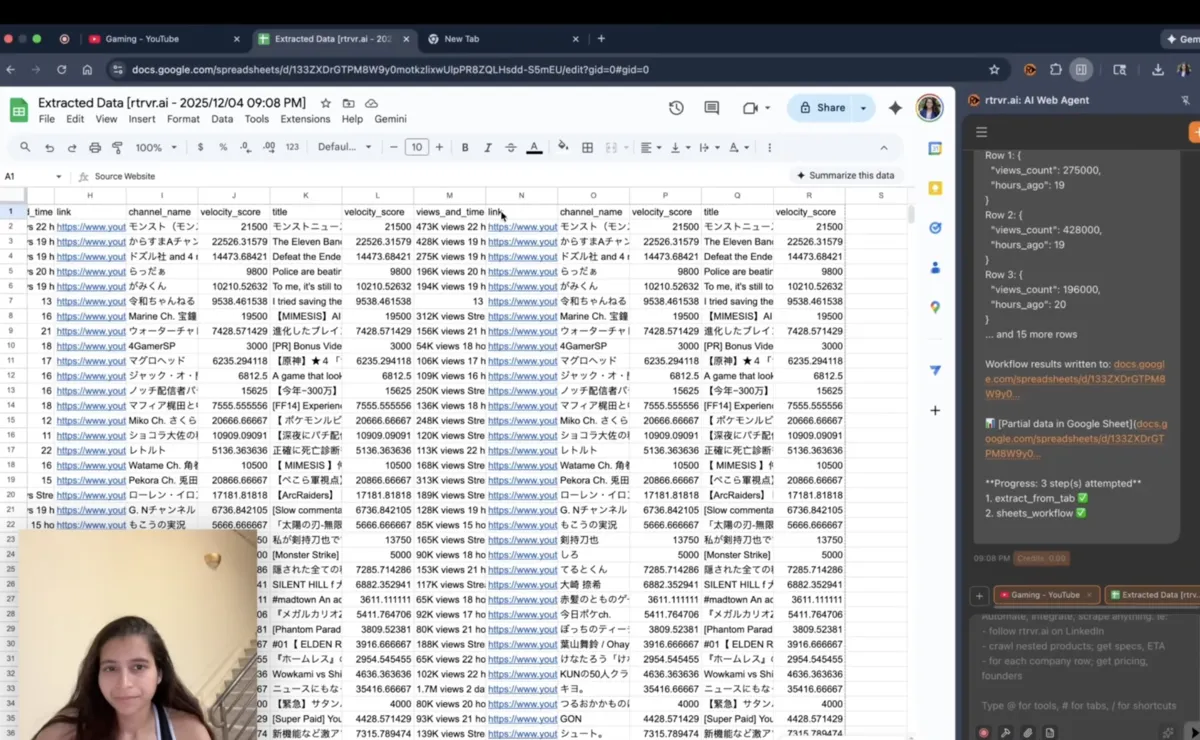
Every week, another "AI web scraper" Chrome extension launches. They all promise the same thing: extract data without code.
But here's what none of them tell you: they're not actually AI agents. They're just scrapers with better UX.
Chat4Data? You're still selecting data fields and configuring extraction plans. Thunderbit? Point-and-click with "AI suggestions." Browse AI? Train robots through clicking. Bardeen? Build playbooks through visual workflows. Instant Data Scraper? Heuristic pattern matching.
rtrvr.ai is different. It's not a scraper with an AI coat of paint. It's a full autonomous agent with 20+ specialized sub-agents that can:
- Apply to jobs end-to-end (navigate, fill forms, upload resume, submit)
- Generate content on ChatGPT, then post it to LinkedIn, Twitter, and Instagram
- Create custom API integrations from on-screen documentation
- Run scheduled workflows that continuously append to Google Sheets
- Execute multi-step research across dozens of sites in parallel
And it's completely free with your own Gemini API key.
This isn't a feature comparison. It's a paradigm comparison.
TL;DR: The 60-Second Reality Check
| Capability | rtrvr.ai | Chat4Data | Thunderbit | Browse AI | Bardeen | Instant Data Scraper |
|---|---|---|---|---|---|---|
| Price | Free with BYOK | $10-35/mo | $15-249/mo | $48-250/mo | $60-500/mo | Free (limited) |
| Truly Agentic | ✅ Yes | ❌ No | ❌ No | ❌ No | ❌ No | ❌ No |
| Just Type a Prompt | ✅ Yes | ⚠️ Partial | ❌ No | ❌ No | ⚠️ Partial | ❌ No |
| End-to-End Actions | ✅ Yes | ❌ Extract only | ❌ Extract only | ❌ Extract only | ⚠️ Limited | ❌ Extract only |
| File Uploads | ✅ Yes | ❌ No | ❌ No | ❌ No | ❌ No | ❌ No |
| Generate + Post Content | ✅ Yes | ❌ No | ❌ No | ❌ No | ❌ No | ❌ No |
| Custom Tool Creation | ✅ Yes | ❌ No | ❌ No | ❌ No | ❌ No | ❌ No |
| Scheduled Monitoring | ✅ Yes | ❌ No | ⚠️ Paid only | ✅ Yes | ⚠️ Limited | ❌ No |
| Background Tab Execution | ✅ 10+ tabs | ❌ No | ❌ No | ❌ No | ❌ No | ❌ No |
| Benchmark Success Rate | 81.4% | Not disclosed | Not disclosed | Not disclosed | Not disclosed | Not disclosed |
The fundamental question: Why pay $50-500/month for a "smart scraper" when you can have a full AI agent for free?
The Paradigm Gap: Scrapers vs. Agents
Let's be precise about terminology, because it matters.
What "AI Scrapers" Actually Do
Chat4Data, Thunderbit, Browse AI, Instant Data Scraper — these tools help you extract data from web pages. They use AI to:
- Detect data fields automatically
- Handle pagination
- Adapt to some layout changes
But fundamentally, they're read-only tools. They look at a page. They pull data off it. That's where their capabilities end.
What an AI Agent Does
rtrvr.ai is an autonomous agent that can:
- Navigate complex multi-step workflows
- Fill out forms and submit applications
- Upload files to any website
- Generate content using other AI tools
- Post that content across platforms
- Create and store custom API integrations
- Execute scheduled workflows continuously
- Recover from errors and adapt to changes
The difference isn't incremental. It's categorical.
Differentiator #1: Free Unlimited Usage with BYOK
Let's talk economics.
Competitor Pricing Reality
| Tool | Monthly Cost | What You Get |
|---|---|---|
| Chat4Data | $10-35/mo | 2,000-8,000 credits |
| Thunderbit | $15-249/mo | 500-20,000 credits |
| Browse AI | $48-250/mo | 2,000-25,000 credits |
| Bardeen | $60-500/mo | 15,000-120,000 credits |
| Octoparse | $119+/mo | 100 tasks |
Credits run out. Costs add up. And you're paying for extraction only.
rtrvr.ai: Genuinely Free
- Install the Chrome Extension
- Get a free Gemini API key from Google AI Studio
- Type
/add-gemini-keyin the extension - Unlimited agentic automation at zero cost
Gemini Flash Lite is nearly free—Google's pricing is fractions of a cent per call. Most users' monthly API costs are under $5 even with heavy usage.
Annual cost comparison:
- Browse AI Pro: $3,000/year
- Thunderbit Pro: $1,500/year
- rtrvr.ai + Gemini: ~$0-60/year
Differentiator #2: Actually Agentic (Not Just "AI-Powered")
Here's the test: Can your tool apply to a job?
Not scrape job listings. Actually apply.
What Job Application Requires
- Navigate to the job posting
- Click "Apply"
- Fill out the application form
- Upload a resume PDF
- Upload a cover letter
- Answer screening questions
- Submit the application
- Confirm submission
Tool Capabilities
Chat4Data: ❌ Can extract job listings. Cannot apply.
Thunderbit: ❌ Can extract job data. Cannot apply.
Browse AI: ❌ Can monitor job boards. Cannot apply.
Bardeen: ⚠️ Can automate some form fills with pre-built playbooks. Cannot handle file uploads or complex multi-step flows reliably.
rtrvr.ai: ✅ Full end-to-end job application
Prompt: "Go to this job posting, apply with my resume,
        and answer any screening questions appropriately"

rtrvr.ai:
1. Navigates to the posting
2. Clicks Apply
3. Fills all form fields from context
4. Uploads resume.pdf
5. Generates and uploads cover letter
6. Answers screening questions
7. Submits application
8. Confirms success
This is the difference between a scraper and an agent.
Differentiator #3: The Super Agent Architecture
Most "AI scrapers" are single-purpose tools. You tell them exactly what to extract, and they extract it.
rtrvr.ai has a hierarchical agent architecture with 20+ specialized sub-agents:
┌─────────────────────────────────────────────────────────────────┐
│                    PLANNING AGENT (Super Agent)                 │
│                                                                 │
│  • Understands your goal                                        │
│  • Breaks it into steps                                         │
│  • Routes to specialized sub-agents                             │
│  • Manages cross-step context                                   │
└─────────────────────────────────────────────────────────────────┘
                              │
              ┌───────────────┼───────────────┬───────────────┐
              ▼               ▼               ▼               ▼
┌──────────────────┐ ┌──────────────────┐ ┌──────────────────┐ ┌──────────────────┐
│   ACT AGENT      │ │  EXTRACT AGENT   │ │   CRAWL AGENT    │ │  UPLOAD AGENT    │
│                  │ │                  │ │                  │ │                  │
│ • Clicks         │ │ • Data fields    │ │ • Pagination     │ │ • File handling  │
│ • Types          │ │ • Schemas        │ │ • Link following │ │ • Form uploads   │
│ • Navigation     │ │ • Validation     │ │ • Deduplication  │ │                  │
└──────────────────┘ └──────────────────┘ └──────────────────┘ └──────────────────┘
              │               │               │               │
              ▼               ▼               ▼               ▼
┌──────────────────┐ ┌──────────────────┐ ┌──────────────────┐ ┌──────────────────┐
│   SHEETS AGENT   │ │    PDF AGENT     │ │   TOOL AGENT     │ │  MONITOR AGENT   │
│                  │ │                  │ │                  │ │                  │
│ • Read/Write     │ │ • Parse PDFs     │ │ • Custom APIs    │ │ • Scheduling     │
│ • Row iteration  │ │ • Fill forms     │ │ • Tool creation  │ │ • Change detect  │
└──────────────────┘ └──────────────────┘ └──────────────────┘ └──────────────────┘
What This Enables
Complex prompt:
"Set the filters to senior engineering roles in San Francisco,
then extract the first 10 pages of results with company, title,
salary, and application link"
What happens:
- Planning Agent understands the multi-step goal
- Act Agent sets the filters
- Crawl Agent handles pagination across 10 pages
- Extract Agent pulls structured data from each listing
- Results delivered to you
While you do other work. The agent runs in background tabs.
No other Chrome extension can do this. They require you to:
- Manually set filters first
- Configure extraction on the results page
- Handle pagination separately
- Stay on the page while it runs
Differentiator #4: No Configuration Required
How Competitors Work
Chat4Data:
- Install extension
- Open target page
- Click "Scan for data fields"
- Review suggested fields
- Accept or modify the plan
- Configure pagination settings
- Start extraction
Thunderbit:
- Install extension
- Open target page
- Click "AI Suggest Fields"
- Review and modify suggestions
- Configure pagination manually
- Set up export destination
- Start extraction
Browse AI:
- Install extension
- Train a "robot" by clicking elements
- Define extraction patterns
- Configure pagination handling
- Set scheduling (if needed)
- Save and run the robot
Bardeen:
- Install extension
- Find or create a "playbook"
- Configure playbook parameters
- Connect integrations
- Set triggers
- Run the playbook
How rtrvr.ai Works
Prompt: "Extract all products with prices and ratings"
That's it. The agent:
- Understands the page structure
- Identifies relevant data
- Handles pagination automatically
- Returns structured results
No clicking. No configuring. No templates. Just describe what you want.
Differentiator #5: Generate + Post Content Workflows
Here's something no other Chrome extension can do:
Prompt: "Go to ChatGPT, generate a LinkedIn post about AI automation trends,
        then post it to my LinkedIn feed"
rtrvr.ai execution:
- Opens ChatGPT
- Types the content generation prompt
- Waits for response
- Copies the generated content
- Navigates to LinkedIn
- Creates a new post
- Pastes and formats the content
- Publishes
This is cross-application workflow automation that treats the entire web as your workspace.
More Examples
Research → Report:
"Research the top 5 competitors in the CRM space,
compile findings into a Google Doc with pros/cons for each"
Data → Action:
"Find all companies in this spreadsheet that don't have a LinkedIn page,
search for them on LinkedIn, and add the URLs back to the sheet"
Multi-Platform Content:
"Take my latest blog post, create a Twitter thread summary,
an Instagram caption, and a LinkedIn article, then post all three"
Chat4Data, Thunderbit, Browse AI, Bardeen—none of them can chain actions across multiple applications like this.
Differentiator #6: Custom Tool Creation
rtrvr.ai can create and store custom API integrations from on-screen documentation.
Prompt: "Use the on-screen HubSpot API documentation to create a tool
        that adds contacts to my CRM"
What happens:
- Agent reads the API docs on the current page
- Generates JavaScript code to call the API
- Prompts you for your API key (stored locally, never transmitted)
- Saves the tool for future use
- Tool is now available: "Add [contact] to HubSpot"
Now you can chain it:
"Go to LinkedIn, find CTOs at Series B companies in NYC,
and add each one to HubSpot as a new contact"
The agent uses your custom HubSpot tool automatically.
No other Chrome extension offers this capability.
Differentiator #7: Scheduled Monitoring with Continuous Append
The Monitoring Problem
You want to track competitor prices daily. With most tools:
- You run the extraction manually each day
- OR you pay for their cloud/scheduling tier
- Each run creates a new file
- You manually consolidate results
rtrvr.ai's Solution
Schedule Configuration:
├── Frequency: Daily at 9 AM
├── Tab Reuse: Enabled (keeps authenticated sessions)
├── Sheet Output: "Append to same sheet"
└── Notifications: Slack webhook
What this creates:
A continuously growing master tracker:
| Date | Product | Price | Stock | Competitor |
|---|---|---|---|---|
| Jan 15 | Widget Pro | $99 | Yes | Acme Corp |
| Jan 16 | Widget Pro | $89 | Yes | Acme Corp |
| Jan 17 | Widget Pro | $89 | No | Acme Corp |
| Jan 18 | Widget Pro | $79 | Yes | Acme Corp |
Tab Reuse means the agent uses your existing logged-in sessions. No re-authentication. Works on protected sites.
Auto-Append means historical data accumulates automatically. Perfect for:
- Price tracking over time
- Inventory monitoring
- Job market analysis
- News aggregation
- Competitor intelligence
Differentiator #8: Background Tab Parallel Execution
The Single-Tab Problem
Most Chrome extensions require you to:
- Stay on the page being scraped
- Wait for extraction to complete
- Cannot work on other tabs
This is because they use visible DOM manipulation that requires the tab to be active.
rtrvr.ai: 10+ Parallel Background Tabs
Because we use DOM-native intelligence (not screenshots), rtrvr.ai can operate on tabs you're not looking at:
Your Browser:
├── Tab 1: LinkedIn (agent extracting) [background]
├── Tab 2: Competitor A pricing [background]
├── Tab 3: Competitor B pricing [background]
├── Tab 4: Job board A [background]
├── Tab 5: Job board B [background]
├── Tab 6: Google Sheets (agent writing) [background]
└── Tab 7: Your actual work [active]
Productivity impact:
- Competitors: 100 URLs × 2 min each = 200 minutes (3+ hours)
- rtrvr.ai: 100 URLs ÷ 10 parallel tabs = 20 minutes
And you're working on something else the entire time.
Real-World Use Case Comparisons
Use Case 1: Lead Generation from LinkedIn
Chat4Data approach:
- Go to LinkedIn search
- Configure extraction fields (name, title, company, URL)
- Set pagination
- Export to CSV
- Manually upload to CRM
- Time: 30-45 minutes, extraction only
rtrvr.ai approach:
"Find 50 marketing directors at SaaS companies in NYC,
extract their profiles, and add them to HubSpot as leads"
- Agent handles search, extraction, and CRM integration
- Time: 15 minutes, fully integrated
Use Case 2: Competitive Price Monitoring
Thunderbit approach:
- Create scraper for Competitor A
- Create scraper for Competitor B
- Create scraper for Competitor C
- Run each manually or pay for scheduling
- Download separate files
- Manually consolidate
- Time: 1-2 hours setup, ongoing manual work
rtrvr.ai approach:
"Monitor these 5 competitor product pages daily,
extract prices and stock status, append to my tracking sheet"
Schedule once. Results accumulate automatically. Time: 5 minutes setup, zero ongoing work
Use Case 3: Job Application Pipeline
Browse AI approach:
- ❌ Cannot do this. Extraction only.
Bardeen approach:
- ⚠️ Can fill some forms with playbooks
- ❌ Cannot handle file uploads
- ❌ Cannot answer dynamic screening questions
rtrvr.ai approach:
"For each job in my 'Applications' sheet, go to the apply link,
submit my resume, and mark the status as 'Applied'"
Full end-to-end automation with file uploads and form completion.
Benchmark Performance
While competitors don't publish benchmark results, we do.
rtrvr.ai on Halluminate Web Bench:
| Metric | rtrvr.ai | Industry Average |
|---|---|---|
| Overall Success Rate | 81.4% | 40-66% |
| Read Tasks | 88.24% | ~60% |
| Write Tasks | 65.63% | ~40% |
| Avg Execution Time | 0.9 min | 6-12 min |
| Infrastructure Errors | 3.39% | 20-30% |
Our DOM-native architecture achieves these results using Gemini Flash Lite—the cheapest model available—because structured DOM input requires less reasoning than screenshot parsing.
Honest Assessment: When to Use What
Use Chat4Data If:
- You only need simple data extraction
- Conversational interface appeals to you
- You don't need any automation beyond scraping
- Budget is very tight ($10/month)
Use Thunderbit If:
- You want fast extraction with AI field suggestions
- You're comfortable with some configuration
- You don't need end-to-end workflows
- You want Google Sheets integration
Use Browse AI If:
- You need website monitoring specifically
- You want to train reusable "robots"
- You don't mind the point-and-click setup
- You need change detection alerts
Use Bardeen If:
- You need workflow automation across apps
- You're building sales/GTM playbooks
- You want pre-built templates
- Integration ecosystem is priority
Use Instant Data Scraper If:
- You need quick, free extraction
- The site is simple and well-structured
- You don't need any automation
- One-off tasks only
Use rtrvr.ai If:
- You want free unlimited usage with BYOK
- You need true agentic automation (not just extraction)
- You want to just type a prompt without configuration
- You need end-to-end workflows (forms, uploads, submissions)
- You want scheduled monitoring with auto-append
- You need cross-application automation
- You want custom tool creation
- You need parallel background execution
- Benchmark-proven reliability matters
The Bottom Line
The Chrome extension "AI scraper" market is crowded with tools that are fundamentally the same: point-click-extract with varying degrees of AI assistance.
rtrvr.ai is categorically different.
It's not a smarter scraper. It's an autonomous agent that treats the entire web as its workspace. It can navigate, interact, fill forms, upload files, generate content, post across platforms, create custom integrations, and run scheduled workflows.
And it's free.
The question isn't "which scraper is best?" The question is: "Do you want a scraper, or do you want an agent?"
Get Started in 2 Minutes
-
Get a free Gemini API key from Google AI Studio
-
Type
/add-gemini-keyin the extension -
Describe what you want in natural language
That's it. No credit cards. No trial limits. No configuration.
The web is your database. rtrvr.ai is your agent.
Resources
- Chrome Extension — Install free
- Cloud Platform — Scale to thousands of browsers
- API Documentation — Programmatic access
- MCP Server — Connect to Claude, Cursor, any MCP client
- Discord Community — Join 30,000+ users
- Benchmark Results — See the data
Questions? Join our Discord or email support@rtrvr.ai


