
 Add to Chrome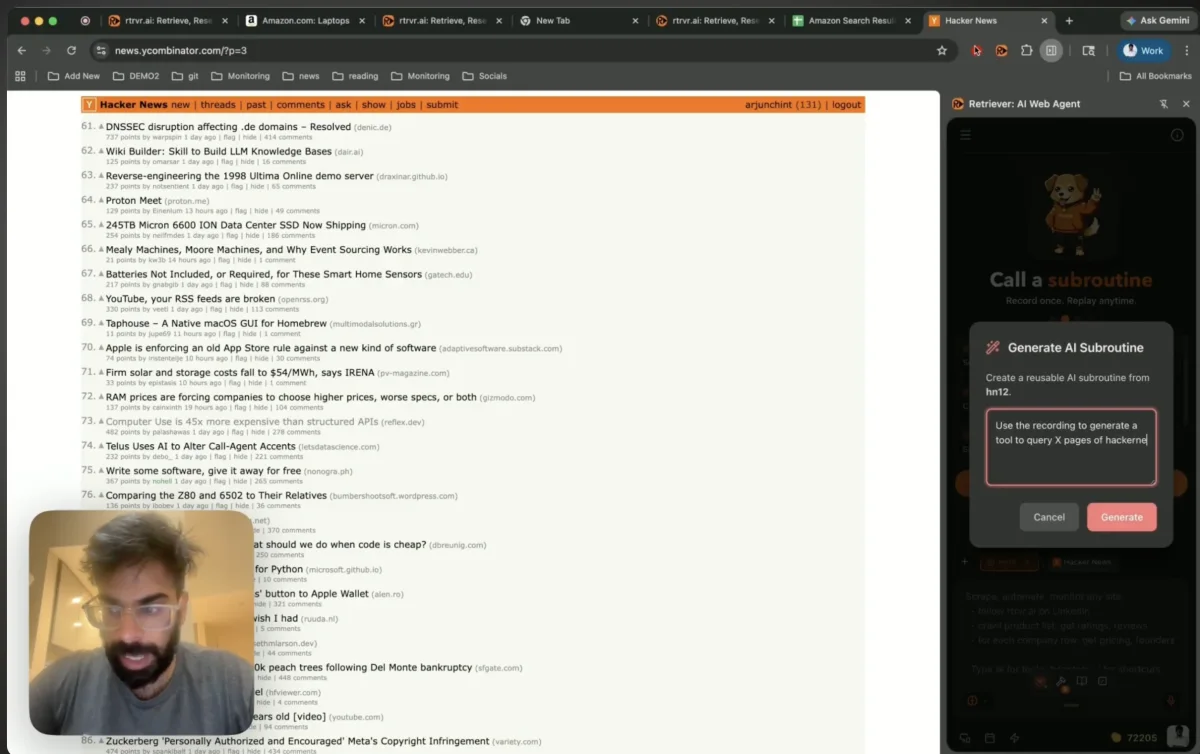
Most web agents solve the wrong half of the problem. You can get an LLM to post on X, DM on Instagram, or send a LinkedIn connection request — once. The moment you need to do it a thousand times, the economics break: tokens per invocation, latency per invocation, non-determinism per invocation. On outreach, CRM updates, and bulk posting, "the agent clicked the wrong button this time" is not a quirk. It's a failure mode.
The obvious fix is to skip the UI and call the site's internal API directly. That's correct, and it's where most "just call the API" projects die. Because the hard problem isn't the endpoint. It's auth.
Auth is the actual hard problem
Authenticated web requests carry some combination of cookies, rotating CSRF tokens, session tokens, bearer headers, anti-replay nonces, fingerprint-bound parameters, and request-signing hashes computed in the site's own JS at request time. Some are set by the server. Some are derived in the browser. Some rotate per request.
Out-of-process scrapers — Node workers, Playwright workers, cloud functions — have to rebuild all of that out of band. That's the thing that breaks the moment a site rotates a header or ships a new signing scheme. Most HAR-replay tooling ends its useful life right here.
The trick: record in the extension, replay inside the webpage
In rtrvr, both the recording and the replay happen inside the user's browser, from within the webpage itself.
- The extension intercepts the network requests the tab makes while you perform the task. Two layers: a MAIN-world
fetch/XHRpatch installed before any page script runs, with Chrome'swebRequestAPI as a correlated fallback for the CORS and service-worker paths the in-page patch can't see. Request bodies — FormData, Blob, raw bytes, not just JSON — are captured too. - When the script runs later, those requests are dispatched from the page's own execution context — same origin, same cookies, same TLS session, same JS that computes the signed headers.
No Puppeteer driver. No headless worker. No separate TLS stack. The browser does what it always does: attach the cookies, run the site's own JS to compute the headers, ship the request.
Auth, CSRF, signing, and fingerprinting all propagate for free. The agent never touches any of it. No key extraction, no session rebuild, no proxy rotation.
This sounds like a footnote. It's the whole architecture.
Ranking and trimming the network capture
There's a second problem hiding inside "just record the network." A typical minute of browsing fires dozens to hundreds of requests per tab — analytics beacons, RUM pings, feature-flag polls, third-party pixels, prefetches, media chunks, hot-module reload pokes. The actual API call you care about is often 3 requests out of 300.
You cannot hand all of that to an LLM to figure out which one is the tool. It does not fit in the context window, and even if you paid to stretch it, the signal drowns in the noise.
So before the generator sees anything, we rank and trim the capture. Requests are scored on a handful of weighted signals:
- First-party vs. third-party origin (+20 / −15). A known telemetry host — Sentry, Segment, Hotjar, RUM, the usual suspects — is a flat −80. It does not matter how well it correlates with a click; it is not the tool.
- Temporal correlation to the DOM event (+28 within 800ms, +16 within 2.5s). A
POSTthat fires 40ms after you click "Send" is almost certainly the send. - Method and payload shape (mutating POST/PUT/PATCH/DELETE: +35; GET: +5; with a request body: +8; OPTIONS/HEAD/perf entries: −40).
- Response quality (2xx: +12; 4xx+: −25; non-empty body: +4).
- Volatile operation identifiers (−18). Requests that carry a GraphQL
queryId,doc_id,operationHash, or any build-specific hash in the URL or body. They look correct today and break the moment the site redeploys.
Concretely: a first-party mutating POST that fires 80ms after a click with a 200 response and a body lands around +83. A generic analytics beacon is −80. Everything in between gets ordered and the top five survive. Those five plus the DOM interactions around them get rendered into a 12 000-character context for the generator; if it overruns, we drop visited URLs first, then network candidates, then DOM hints, and re-render until it fits.
Even after ranking, a strong candidate is not automatically replay-worthy. If the top request carries a volatile operation identifier — X's queryId, Meta's doc_id, any GraphQL operation hash pinned to the current deploy — the planner forces a DOM-only tool regardless of score, and the generator is instructed not to surface those values in the first place (Do NOT expose or discover queryId/doc_id/operationHash values). This is the single most useful failure case to catch early: network replay looks great in a demo and breaks quietly a week later when the site ships. The docs go deeper on how the DOM / network / hybrid decision is made and the rtrvr.* helper namespace the generated code uses.
This is the unglamorous step that makes recording→Subroutine actually work. In-page execution solves auth for free; ranked trimming — with the volatile-ID circuit breaker — is what lets the generator reliably pick the right request to templatize.
Subroutines are tool calls, not macros
A recorded task — a Subroutine — is registered as a callable tool in the agent's tool set, next to search and fetch:
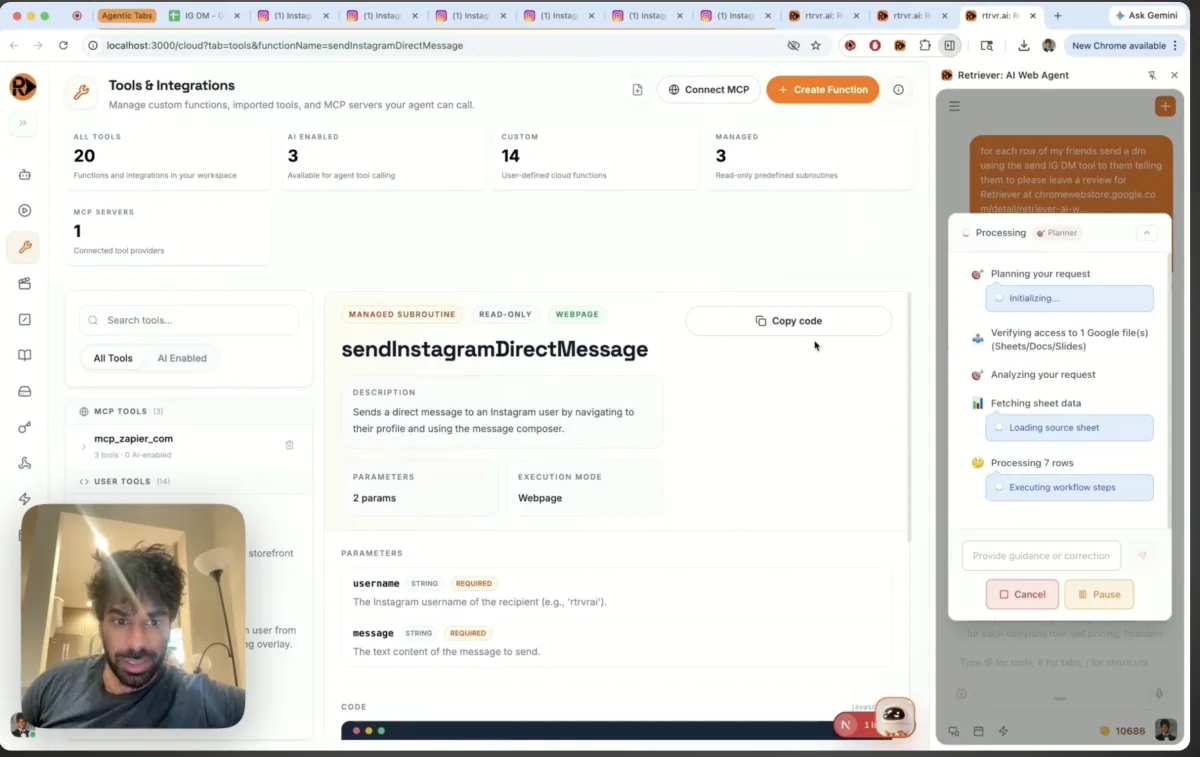
Sheet of Instagram URLs    →  sendInstagramDirectMessage({ url, message })
Daily content queue        →  createXPost({ text, mediaUrl })
List of profiles           →  sendLinkedInConnectionRequest({ url, note })
Point the agent at a sheet of 500 rows. It picks parameters per row. The Subroutine runs. The LLM is invoked exactly once per row — for parameter selection — and the action itself is a script.
- Zero token cost on the hot path. The replay is a
fetch, not an inference. - Deterministic. Same input, same output, every time.
- Low detection surface. Requests come from the same origin, with the same headers, in the same user session that sent the original.
- LLM-callable from natural language. The agent reaches for a Subroutine the same way it reaches for any other tool, inferring parameters from whatever tab is open.
Inside a Subroutine: the rtrvr helpers
A Subroutine is a small async JavaScript function that runs in the tab. The parameters the agent passes — the row from the sheet, the target URL, the message body — are injected as const declarations above your code. Inside the body, an rtrvr.* helper namespace covers the common moves you need on real sites without dropping down to brittle selectors or hand-rolled fetch scaffolding:
| Helper | Use |
|---|---|
rtrvr.find({ role, name, text, placeholder }) | Find a semantic page target and return an opaque handle |
rtrvr.click(handleOrTarget) | Click a previously found handle or a semantic target |
rtrvr.type(handleOrTarget, value, { clear, submit }) | Type into inputs or rich contenteditable editors |
rtrvr.waitFor(targetOrFn, { timeoutMs }) | Wait for the next UI state, modal, composer, or control |
rtrvr.waitForUrl(match, { timeoutMs }) | Wait for navigation or route changes |
rtrvr.request(url, init) | Make authenticated in-page requests using the page context |
rtrvr.requestJson(url, init) | Same as request, but parses JSON when available |
rtrvr.getCsrfToken() | Read the current-page CSRF token |
rtrvr.getCookie(name) | Read a cookie from the current page |
A minimal LinkedIn "connect" Subroutine:
const button = await rtrvr.find({
  role: "button",
  name: /Connect/i,
});

if (!button) {
  return { success: false, error: "Connect button not found." };
}

await rtrvr.click(button);

const csrfToken = rtrvr.getCsrfToken();
return await rtrvr.requestJson("/voyager/api/example", {
  method: "POST",
  headers: {
    "content-type": "application/json",
    "x-csrf-token": csrfToken,
  },
  body: JSON.stringify({ ok: true }),
});
DOM when the UI is the stable contract, rtrvr.request when the endpoint is. The generator mixes them as needed, and because everything runs in the page, cookies and CSRF tokens are just there — you read them, you don't rebuild them.
A few non-obvious implementation details worth knowing:
- Parameters bind as named function arguments, not by string concatenation. A Subroutine body runs inside an
AsyncFunctionwhose parameters are the declared Subroutine params plusrtrvr. Your code referencesurlandmessagedirectly — they are not spliced into the source. No template-string injection surface, and param names can't collide with your own locals. rtrvr.findwalks open shadow roots. LinkedIn's messaging overlay and most Material 3 components mount interactive elements inside open shadow roots; naivedocument.querySelectormisses them silently. Whenfindfails it also returns the three closest candidates with their roles and names, so a broken recording tells you why instead of just timing out.rtrvr.requestdoes CSRF discovery and header hygiene for you. It readsct0/XSRF-TOKEN/csrftokenfrom the cookie jar (and common meta-tag variants), injectsx-csrf-tokenwhen missing, and strips replay-hostile headers from the recorded request (set-cookie,x-client-transaction-id,livepipeline-session) so one run's anti-replay nonce doesn't poison the next.
What this doesn't solve
We record HTTP. Sites that do real work over WebSockets, WebRTC, or heavy mid-flow client-side derivation need DOM actions interleaved into the Subroutine. That path is slower and less reliable — we treat it as a fallback, not the default.
Subroutines also need re-recording when a site meaningfully changes its API. That is the cost of not running an LLM on the hot path. In practice sites churn their APIs much less often than their DOM, so we think the tradeoff is correct — but it is a tradeoff, not a win on every axis.
How this is different from what else exists
Browser-Use and Stagehand keep the LLM in the runtime action path. Great for one-offs. Expensive and non-deterministic at scale.
Libretto (shipped last month, very similar intuition) moves the LLM to code-generation time and emits Playwright scripts. Big step in the right direction. But Playwright runs out-of-process, so the auth problem comes back — you inherit Playwright's session, not the user's, and every auth scheme a browser natively handles (SSO redirects, refresh-token rotation, service-worker-fetched tokens, DPoP, mTLS) becomes something you re-implement outside the browser.
What is novel here is not "pre-generate a script instead of deciding at runtime." It is pre-generate a script that runs in the same browser context as the user, so auth is never a separate problem.
The end goal: a library for the action space of the web
One Subroutine is a tool. A library of Subroutines is coverage.
Today, "an agent can in principle do anything on the web" is technically true and operationally useless. You can't run a business on in principle. The thing that's missing is a shared, deterministic vocabulary of what the agent can actually do, right now, on real sites, at zero token cost — sending a LinkedIn DM, booking a calendar slot, filing a Zendesk ticket, creating a Shopify draft order, updating a HubSpot contact — reliably, not hopefully.
That's the bet behind Subroutines. We're building toward a public, community-maintained library of them, alongside templates and datasets, that collectively extends the action space of the web for agents. Preinstalled Subroutines for Instagram, X, and LinkedIn ship in the extension as the seed. The library grows by shipping more of them, and by letting users record their own and share them.
The helper surface itself keeps growing too. Writing rows back to Google Sheets, manipulating common rich editors, structured file I/O, cross-tab coordination, scheduling follow-up runs — every helper we add lets a bigger share of real web-agent work be written as a deterministic script instead of an LLM loop. The direction is concrete: nearly the entire functionality of a web agent — parameter selection at the top, action in the middle, result-writing at the bottom — eventually expressible as zero-token Subroutines, with the LLM only reaching in where judgment is actually required.
If you've ever written a glue script that did one useful thing on one site and then died when the site rotated a header — that's a Subroutine waiting to be recorded in-page so it actually survives.
Also in this release
Shipping alongside Subroutines:
- BYO ChatGPT or Claude subscription — OAuth into OpenAI or Anthropic from the extension and drive the agent on the plan you already pay for, no separate API key.
- WhatsApp control — save any executed workflow as a shortcut, then
/run,/schedule,/trigger, and/check_schedule_resultsfrom a chat thread while the browser runs at home. - Knowledge Base + MCP upgrades — cloud scrape-and-index for KBs, new MCP tools for KBs / recordings / schedules / Subroutines, and copy-ready API snippets on every cloud panel so any execution, KB chat, or tool call is one curl away.
- Rover + Agent analytics — drop the Rover script tag on your site to get agent-readable structure plus a PostHog-style analytics view: visits, trajectories, an AX Score (0-100), agent feedback, and persistent memory so returning agents don't start from scratch.
Plus the rest of the surface: Knowledge Base + MCP upgrades (cloud scrape-and-index, new MCP tools for KBs / recordings / schedules / Subroutines, copy-ready API snippets on every cloud panel so any execution, KB chat, or tool call is one curl away), .docx / .xlsx / .pptx uploads in chat, email+password sign-in, accessibility-tree clipping (⌘Ctrl+C grabs a richer tree than text scrapers), on-device voice input, URL-aware dynamic templates, and a UI + perf pass.
Try it
Install the Chrome Extension. Hit record. Do the task once. Save it as a Subroutine. Point the agent at a spreadsheet or list to apply on in parallel.
Full tool-calling docs — DOM vs. network tradeoffs, the rtrvr.* helper namespace, parameter shape, and the generator flow — live at /docs/tool-calling#custom-javascript-tools. Source and examples: github.com/rtrvr-ai.
Would love feedback, especially from anyone who has tried to run authenticated browser automation at scale and hit the session-rebuild wall — or who has an opinion on what belongs in a shared Subroutine library first.
— Arjun & Bhavani, rtrvr.ai


