
 Add to Chrome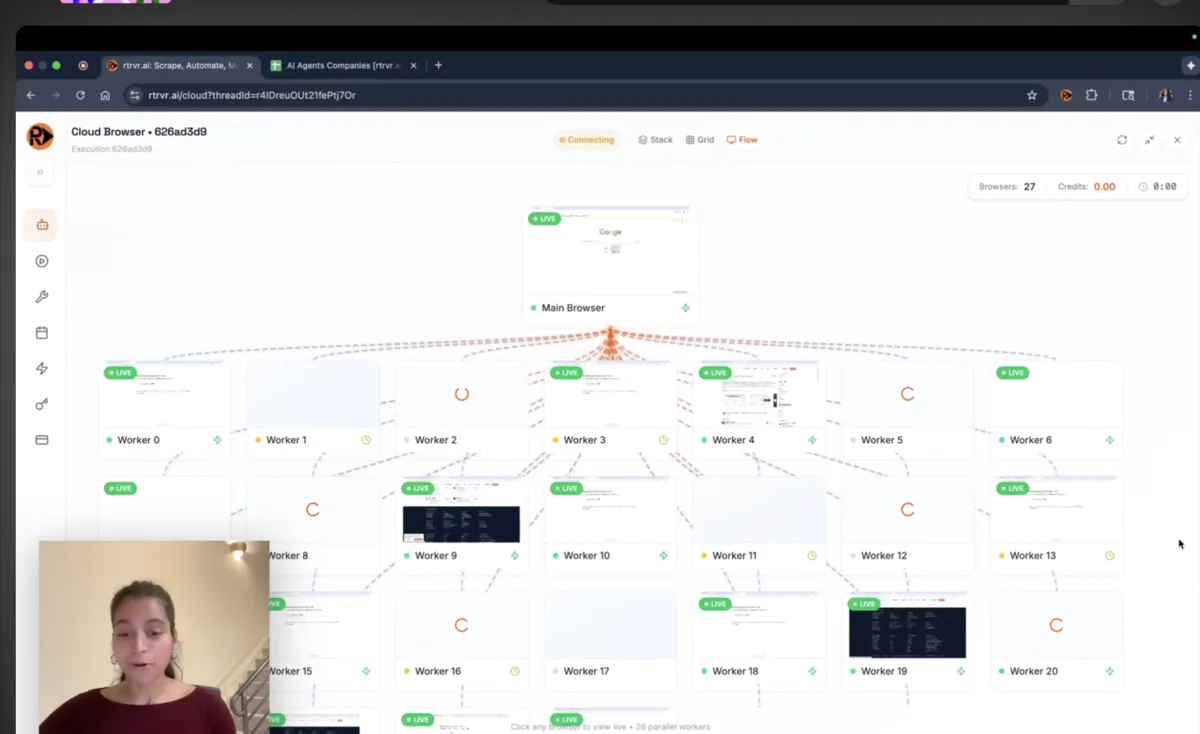
Cloud Run Relay + DOM-Native Automation
Web agents don't fail in production because "LLMs can't click buttons."
They fail because the web is a distributed system disguised as a UI: dynamic DOMs, nested iframes, cross-origin boundaries, shadow roots, overlays, challenge flows, flaky UI state — and once you ship… you go blind.
This post is about the thing that made everything else easier for us:
Live view + takeover for ephemeral cloud browsers - without relying on sticky instance routing - and how that changed our debugging loop for real-world web agent failures.
We'll cover:
- Why we built live VNC view + takeover (born from prod debugging pain)
- The Cloud Run constraints that make "just add VNC" fragile
- The architecture that works: Runner + Relay + signed pairing tokens
- Why we moved from Fluxbox to Xvfb + x11vnc + xsetroot
- A pragmatic security model (no public VNC ports; execution-bound access)
- Production metrics + what we're instrumenting next
- How this fits with our broader approach: DOM-native automation (no screenshots/vision) and no CDP / Playwright / Puppeteer
TL;DR
- rtrvr.ai is DOM-native: we read and reason over the DOM directly - not pixels - and we don't use screenshots/vision as the primary understanding layer
- We avoid CDP-based automation (and the "debugger port" control model). We integrate with Chrome via extension APIs (locally and in cloud browsers)
- We built live VNC view + takeover because debugging native captcha solving (image selection challenges) required seeing exactly what the agent sees in real-time logs weren't enough
- Cloud Run's reality (best-effort affinity + WebSockets + autoscaling) pushes you toward a design where the viewer never needs to hit the same worker instance
- The solution: a separate relay service that pairs
viewer ↔ runnervia short-lived signed tokens and forwards bytes
Context: Our Agent is DOM-Native (and That's Why Observability Still Matters)
Most web agents fall into one of two camps:
1) Vision-first "computer use" agents screenshot → vision model → guess what's clickable → click
2) CDP tooling Playwright/Puppeteer/Selenium via Chrome DevTools Protocol
We take a third path:
- DOM-native intelligence via Chrome extension APIs (locally and in the cloud)
- No screenshot parsing as the primary "understanding layer"
- No CDP / Playwright / Puppeteer / debugger port controlling the browser
If you want the deeper details:
"If you're DOM-native, why VNC?"
Because humans still debug with eyes.
VNC isn't how the agent understands the web. It's how we:
- see the real page state in production
- verify what the agent clicked
- identify the frame/realm/shadow boundary we mis-targeted
- recover runs via takeover (then hand back control to the agent)
What We Shipped (Product Surface)
What users get:
1) Live VNC view + takeover for cloud browsers
- Watch what's happening in prod
- Take control mid-run when needed
- Optionally attach "later" while a scheduled run is still active
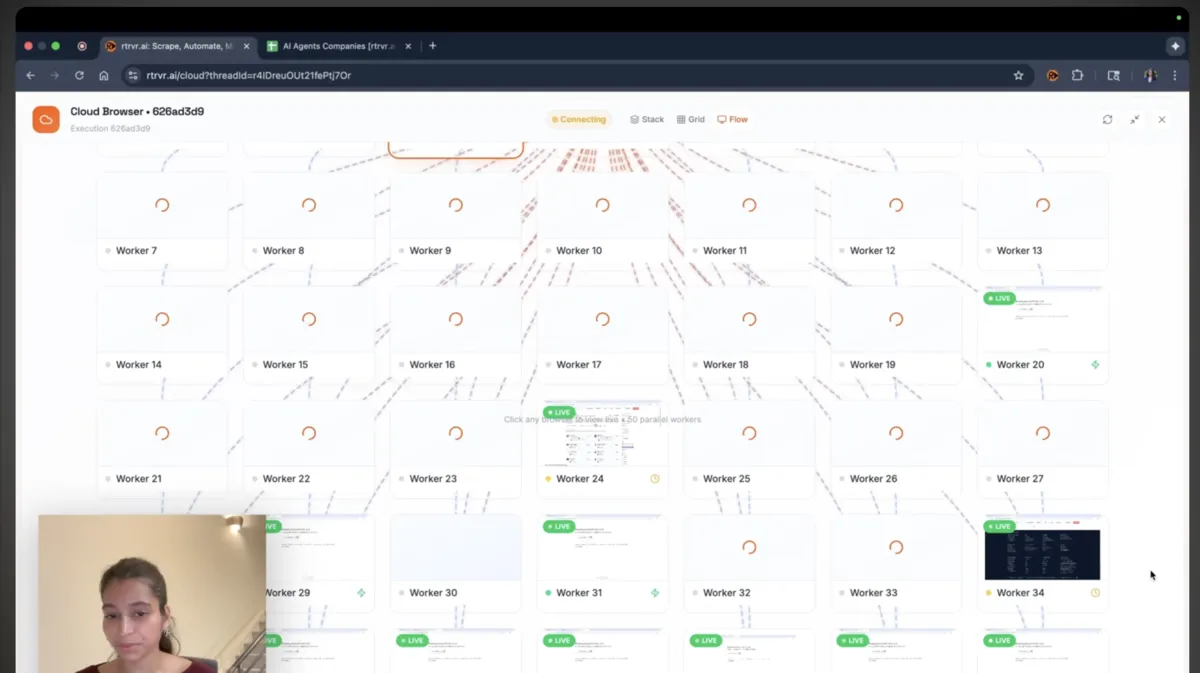
2) Parallel execution UI
- When we run 50-100+ browsers in parallel, users see a grid/graph
- This turns "hours of web research" into minutes
3) Better action success in iframes / shadow DOM / cross-origin boundaries
- We've done heavy work to traverse and target the correct realm/subtree reliably
4) Templates (rtrvr.ai/retrieve) + Shareable outputs
- One-click workflows
- Share results via a single URL
This post focuses on the engineering behind live view + takeover - because that's the piece most builders underestimate.
The Moment That Forced This: Native Captcha Solving
We made a deliberate choice early on: no third-party captcha services.
Why? We don't want to insecurely forward user data to external providers. We don't want dependencies on services that could disappear or change pricing. And frankly, if our DOM intelligence can traverse iframes, shadow DOM, and cross-origin boundaries - it should be able to handle captchas natively.
So we built it. And it works.
Our agent can click through Google reCAPTCHA - including the image selection challenges - by leveraging the same iframe and shadow DOM capabilities we use everywhere else. The captcha widget lives in a cross-origin iframe? We handle it. The checkbox is inside nested shadow roots? We handle it.
But here's where it got interesting: image selection captchas.
When the agent needs to "select all images with traffic lights," it's making real-time decisions about which tiles to click. And when something goes wrong - when it's clicking the wrong images or missing tiles - logs don't tell you why.
I found myself staring at execution logs thinking: "Did it click the right images? Which ones did it miss? Was the grid even fully loaded?"
That's when I wanted to just see it.
Not screenshots after the fact. Not logs describing click coordinates. I wanted to watch the agent work through a captcha in real-time, see exactly what it was seeing, and understand where decisions went wrong.
That debugging need - born from native captcha solving - is what drove the VNC implementation.
Cloud Run Realities: Why Naive "VNC in the Runner" Breaks
If you're running ephemeral Chrome workers on Cloud Run, you can't wish away these constraints:
1) Concurrency is a cap, not isolation
By default, a Cloud Run instance can serve multiple requests concurrently. If you want "one browser per container" and clean isolation, set runner concurrency=1.
This is the simplest model that keeps "one execution ↔ one browser ↔ one container" consistent.
2) Session affinity is best-effort (not a correctness primitive)
Even with session affinity enabled, Cloud Run explicitly frames it as best-effort. You can't build a system that depends on "viewer reconnects always hit the same instance" and expect it to hold under autoscaling, restarts, or deployment rollouts.
3) WebSockets don't make stickiness deterministic
WebSockets on Cloud Run still inherit the platform's routing reality. New WebSocket requests can land on different instances; if your design requires "attach to the exact same instance later," you will eventually lose that bet.
So we designed around one principle:
Never require the viewer to hit the same runner instance.
The Architecture That Survives Production: Runner + Relay + Signed Pairing Tokens
Design Goals
- Runner stays clean: concurrency=1, one browser per container, minimal mixed traffic
- Viewer can attach "later" without sticky routing hacks
- VNC is gated by auth and bound to the correct execution session
- No public VNC ports. No "open 5900 to the internet"
High-Level Architecture
┌─────────────────────────────────────────────────────────────────────────┐
│                           VIEWER (noVNC)                                │
│                         User's Browser                                  │
└────────────────────────────────┬────────────────────────────────────────┘
                                 │
                          wss /vnc
                                 │
                                 ▼
┌─────────────────────────────────────────────────────────────────────────┐
│                          VNC RELAY                                      │
│                     Cloud Run (high concurrency)                        │
│                                                                         │
│   • Token validation (sid + uid + role)                                 │
│   • Viewer ↔ Runner pairing                                             │
│   • Bidirectional byte forwarding                                       │
└────────────────────────────────┬────────────────────────────────────────┘
                                 │
                       wss /agent (outbound)
                                 │
                                 ▼
┌─────────────────────────────────────────────────────────────────────────┐
│                           RUNNER                                        │
│                  Cloud Run (concurrency=1)                              │
│                                                                         │
│   ┌─────────────┐    ┌─────────────┐    ┌─────────────┐                │
│   │   Chrome    │◄───│    Xvfb     │◄───│   x11vnc    │                │
│   │  + Extension│    │  :99 display│    │  TCP 5900   │                │
│   └─────────────┘    └─────────────┘    └─────────────┘                │
│                                              (localhost only)           │
└─────────────────────────────────────────────────────────────────────────┘
"Attach Later" Flow
1. User Browser ──► API: Request viewer token (sid)
   API ──► User: viewerToken(sid, uid, exp, role=viewer)

2. Runner ──► API: Request runner token (sid)
   API ──► Runner: runnerToken(sid, uid, exp, role=runner)

3. User Browser ──► Relay: wss /vnc (viewerToken)
   Runner ──► Relay: wss /agent (runnerToken)

4. Relay validates tokens, matches sid+uid, pairs viewer↔runner
   Relay ◄──► User: Start forwarding bytes
   Relay ◄──► Runner: Start forwarding bytes
How Pairing Works
A live session is two WebSockets:
viewer → relayat/vncrunner → relayat/agent(outbound from the runner)
Both present short-lived signed tokens (JWT/HMAC) containing:
sid(execution/session id)uid(owner id)role(viewer vs runner)exp(expiry)
Relay pairs only if:
sidmatchesuidmatches- roles are correct
- token is valid + unexpired
Once paired, relay forwards bytes both directions.
Why this matters: attach/reconnect becomes deterministic, and Cloud Run routing becomes irrelevant.
Display Stack: We Started with Fluxbox and Removed It
We started with the "typical headless VNC recipe." It worked - but it was heavier than we wanted.
Iteration 1: Fluxbox (works, but too much)
Fluxbox was fine for "a desktop," but we didn't want a desktop. We wanted:
- deterministic pixels
- minimal overhead
- fewer moving parts
- reproducible background/viewport
Iteration 2: The Minimal Stack (what we shipped)
- Xvfb (virtual X server)
- x11vnc (expose X display over VNC)
- xsetroot (set background to confirm correct display & keep consistent visuals)
- noVNC on the client side
Startup sequence:
# 1) Create a deterministic virtual display
Xvfb :99 -screen 0 1920x1080x24 -nolisten tcp &
export DISPLAY=:99

# 2) Make it visually obvious you're on the right display
xsetroot -solid "#0B0F14"  # pick your brand-friendly dark

# 3) Start Chrome against DISPLAY=:99
google-chrome --no-sandbox --disable-dev-shm-usage ... &

# 4) Expose the display via VNC locally (NOT public)
x11vnc -display :99 -rfbport 5900 -shared -forever -nopw -noxdamage &
Important: we do not expose 5900 publicly. We bridge it through the runner → relay tunnel.
Why the Relay is a Separate Service
We intentionally did not terminate viewer WebSockets on the same runner service that executes tasks:
- WebSockets are long-lived requests → they "occupy" instance capacity
- Even with session affinity, Cloud Run can route new connections to different instances
- We want runner to remain simple: concurrency=1, one browser, isolated execution, predictable scaling
So:
- Runner: executes the agent, owns the browser, stays isolated
- Relay: just pairs + forwards, can run high concurrency, long timeouts
Security Model
The worst version of this system is: "expose raw VNC to the internet."
VNC is literally remote control. Treat it like production SSH:
1) No public VNC ports VNC only exists on localhost inside the runner container.
2) Short-lived tokens Viewer access is tied to an authenticated execution; tokens expire quickly.
3) Session binding
Relay only pairs viewer and runner for the same sid and uid.
4) Role separation Viewer tokens can't impersonate runner tokens (and vice versa).
5) No CDP/debugger port for core automation Our core automation is via Chrome extension APIs, not a debugger backdoor.
Observability: What Live View Immediately Unlocked
1) Captcha debugging became visual
Once we could watch real captcha flows:
- wrong tile selections became obvious immediately
- timing issues (clicking before images fully loaded) became visible
- we could see exactly which images the agent was interpreting correctly vs incorrectly
2) Iframes, shadow DOM, cross-origin boundaries became debuggable
Modern sites are not "one DOM." They are a forest:
- top frame
- nested iframes (sometimes cross-origin)
- shadow roots
- dynamic overlays/modals
Action failures often come down to:
- wrong realm
- wrong subtree
- wrong clickability state
Live view makes these failure classes visually undeniable.
3) Parallel fleets became something users can trust
Once users can see what's happening across a fleet, parallelism becomes less scary:
- failures are localized (one worker fails; the rest complete)
- you can recover outliers via takeover
- throughput becomes a function of parallelism, not patience
Performance & Capacity (Production)
Report date: Jan 2026
Executive Summary
| Service | Status | Avg Concurrent | Error Rate |
|---|---|---|---|
| VNC Relay | Stable | 0.75 sessions | 0% |
| Web Agent (Runner) | Some errors | 0.99 executions | 2.4% |
VNC Relay — Current Load
| Metric | Value |
|---|---|
| Window analyzed | 2,667s (~44 min) |
| Total connections | 88 |
| Avg concurrent viewer connections | 0.75 |
| Avg concurrent runner connections | 1.02 |
| Avg concurrent sessions | 0.75 |
| Error count | 0 |
| Error rate | 0% |
How sessions are computed: each session requires two WS connections (viewer + runner). We compute avg concurrency using request durations and take min(viewer, runner) as paired sessions.
Relay Configuration
| Setting | Value |
|---|---|
| Concurrency | 200 |
| Max instances | 200 |
| Max concurrent connections (ceiling) | 40,000 |
| Max concurrent sessions (ceiling) | ~20,000 |
This ceiling is just concurrency x max_instances ÷ 2. Real limits show up earlier via: sockets/FD limits, memory per connection, bandwidth saturation, autoscaling dynamics.
Bandwidth: The Metric That Matters Next
CPU often looks easy. Bandwidth/session is usually the true limiter.
What we're instrumenting next in the relay:
- bytes runner→viewer, bytes viewer→runner
- attach latency (click → first frame)
- p50/p95 attach latency under load
Runner Latency + Errors
| Metric | Value |
|---|---|
| Window analyzed | 3,415s (~57 min) |
| Total requests | 41 |
| 5xx errors | 1 |
| Error rate | 2.4% |
| Avg concurrent executions | 0.99 |
Latency distribution:
| Percentile | Latency |
|---|---|
| Avg | 153.8s |
| P50 | 118.2s |
| P95 | 513.2s (~8.5 min) |
What Broke (Lessons Learned)
1) "VNC in the runner service" created routing problems Reconnects and attach-later were unreliable. We stopped fighting this and built the relay.
2) Fluxbox was unnecessary complexity It's great if you want a desktop. We didn't. Removing it improved determinism.
3) Bandwidth is the real capacity question CPU looked fine; bandwidth/session is what we're measuring next.
4) The web is many realms, not one page iframe/shadow-root mis-targeting is where many "works in demo, fails in prod" bugs live. Live view made these obvious.
Why This Matters Beyond Debugging
This is the productivity multiplier we care about:
- Give rtrvr a list of URLs + one sentence describing output fields
- Spin up dozens of cloud browsers in parallel
- Return a structured dataset in minutes
- Let users watch and take over when needed
Open Questions
If you've shipped similar "live attach" systems:
- What replaced VNC for you (WebRTC? custom streaming?) and what was the biggest win?
- Best approach for recording/replay of agent runs without insane storage?
- Any gotchas with pairing/rendezvous services at high scale?
References
rtrvr.ai
Cloud Run
- Max concurrent requests / concurrency
- Configure concurrency
- Session affinity
- WebSockets guidance
- Request timeouts
- Max instances


