
 Add to Chrome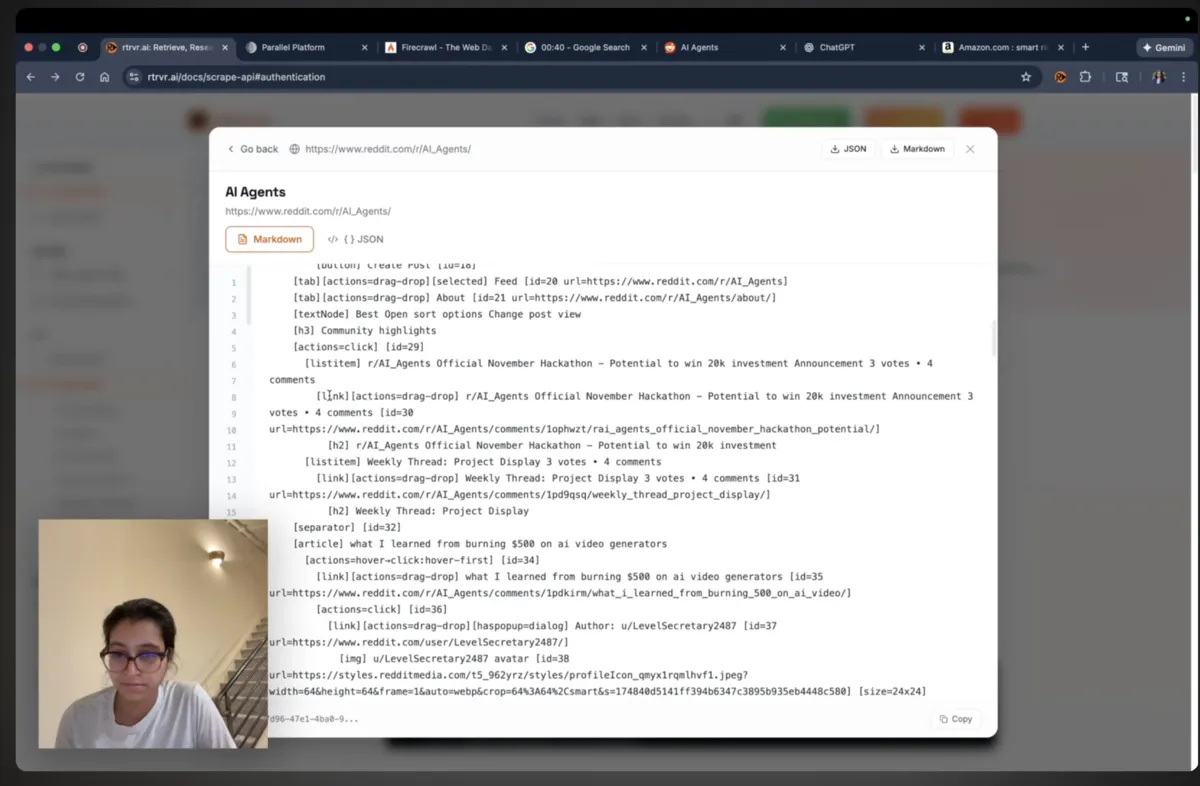
The AI web agent space is facing a fundamental architectural crisis. Most agents fall into one of two camps:
- CDP-based automation (Puppeteer, Playwright, Selenium derivatives)—programmatic browser control that's detectable, insecure, and brittle
- Computer Use Agents (CUA)—screenshot-based vision models that are slow, expensive, and hallucination-prone
Both approaches are fundamentally flawed for production-grade web automation.
rtrvr.ai takes a third path: DOM-native intelligence through Chrome Extension APIs. This article is a technical deep-dive into our architecture—why we built it this way, how it works under the hood, and why it achieves state-of-the-art performance while being faster, cheaper, and more secure than alternatives.
Part 1: Why We Don't Use CDP (And Why That Matters)
The Chrome DevTools Protocol Problem
Most browser automation tools—Puppeteer, Playwright, Selenium 4, and the infrastructure services built on them (Browserless, BrowserBase, etc.)—rely on the Chrome DevTools Protocol (CDP). CDP provides programmatic access to Chrome's debugging interface, enabling control over page navigation, DOM manipulation, network interception, and JavaScript execution.
The problem? CDP was designed for debugging, not production automation.
Security vulnerabilities:
- CDP opens a WebSocket connection that exposes the entire browser session
- Malicious scripts on visited pages can potentially exploit CDP endpoints
- Cross-site scripting (XSS) attacks gain elevated privileges when CDP is active
- Session tokens and credentials are exposed to the debugging interface
Detection footprint:
- CDP adds detectable JavaScript objects (
window.cdc_adoQpoasnfa76pfcZLmcfl_*) - Browser fingerprinting easily identifies CDP-controlled sessions
- Anti-bot systems (Cloudflare, PerimeterX, DataDome) specifically flag CDP patterns
navigator.webdriverflag is set totruein CDP sessions
Operational fragility:
- CDP commands are synchronous and blocking
- Page crashes require full session restart
- Network interruptions break the WebSocket connection
- Concurrent CDP sessions compete for browser resources
rtrvr.ai's Chrome Extension Architecture
We took a fundamentally different approach: native Chrome Extension APIs.
┌─────────────────────────────────────────────────────────────────┐
│                     User's Browser                              │
│  ┌──────────────────────────────────────────────────────────┐  │
│  │              rtrvr.ai Chrome Extension                    │  │
│  │  ┌─────────────┐  ┌─────────────┐  ┌─────────────────┐   │  │
│  │  │ Content     │  │ Background  │  │ DOM Intelligence │   │  │
│  │  │ Scripts     │  │ Service     │  │ Library          │   │  │
│  │  │             │  │ Worker      │  │                   │   │  │
│  │  │ - DOM       │  │ - API Comm  │  │ - Tree Builder    │   │  │
│  │  │   Access    │  │ - Tab Mgmt  │  │ - Semantic Parser │   │  │
│  │  │ - Event     │  │ - Storage   │  │ - Element Scorer  │   │  │
│  │  │   Handlers  │  │ - FCM       │  │                   │   │  │
│  │  └─────────────┘  └─────────────┘  └─────────────────────┘   │  │
│  └──────────────────────────────────────────────────────────┘  │
│                              │                                  │
│                    Chrome Extension APIs                        │
│              (tabs, scripting, storage, runtime)                │
└─────────────────────────────────────────────────────────────────┘
Why Chrome Extension APIs are superior:
- Native browser integration—Extensions are first-class citizens in Chrome's architecture, not debugging backdoors
- Sandboxed execution—Content scripts run in isolated worlds, preventing page scripts from detecting or interfering with automation
- No WebSocket exposure—Communication happens through Chrome's internal messaging, not network-exposed endpoints
- Real browser fingerprint—The browser presents identical fingerprints to CDP-free sessions
- Session persistence—Extensions survive page crashes, network hiccups, and browser updates
The stealth advantage:
When rtrvr.ai interacts with a webpage, there is zero automation fingerprint:
- No
navigator.webdriverflag - No CDP-specific JavaScript objects
- No detectable automation patterns in network requests
- Identical timing characteristics to human interaction
This is why rtrvr.ai works seamlessly with:
- LinkedIn (aggressive bot detection)
- Banking portals (fraud detection systems)
- E-commerce sites (anti-scraping measures)
- Government databases (security-hardened systems)
Part 2: DOM Intelligence vs. Screenshot Vision
The Vision Model Trap
Computer Use Agents (CUAs) from OpenAI, Anthropic, and others take screenshots of web pages and use vision models to:
- Identify interactive elements
- Determine element locations
- Decide what action to take
- Execute via simulated mouse/keyboard input
This approach has fundamental limitations:
Information loss through the vision pipeline:
Raw HTML (semantic) → Rendered pixels → OCR/Vision → Text interpretation
     100%                  ~60%            ~40%           ~30%
Each transformation loses information. By the time a vision model interprets a screenshot:
- Hierarchical relationships are flattened
- Interactive states (hover, focus, disabled) are invisible
- Off-screen content is completely lost
- Dynamic content may not have rendered
- Text in images becomes OCR candidates with error rates
Computational overhead:
- Vision models require 10-100x more compute than text models for equivalent reasoning
- Screenshot encoding adds latency (typically 1-3 seconds per frame)
- Multiple screenshots needed for scrolling/navigation adds multiplicative delay
- High-resolution screenshots consume massive context windows
Hallucination vulnerability:
Vision models are particularly prone to:
- Misidentifying similar-looking elements
- Inventing text that doesn't exist (OCR hallucinations)
- Confusing advertisements for content
- Missing elements obscured by overlays
rtrvr.ai's Smart DOM Tree Approach
Instead of converting semantic information to pixels and back to text, we preserve the semantic structure directly:
Raw HTML → DOM Intelligence Library → Smart DOM Tree → LLM
  100%              100%                  100%          100%
The DOM Intelligence Library is our proprietary parsing system that:
- Traverses the live DOM—Not static HTML, but the actual rendered document with JavaScript modifications
- Constructs accessibility-aware trees—Leveraging ARIA roles, semantic HTML5 elements, and computed accessibility properties
- Scores element importance—Using heuristics developed across millions of page interactions
- Prunes noise—Removing scripts, styles, tracking pixels, and non-interactive elements
- Preserves relationships—Maintaining parent-child hierarchies and sibling associations
Try it yourself: See exactly how our Smart DOM Trees work by visiting our Scrape API Playground. Drop in any URL and compare the structured output to raw HTML.
Sample Output Comparison
Traditional Markdown scraping (Firecrawl-style):
# Welcome to Example Store

Shop our products

[Image] [Image] [Image]

Product 1 - $99.99 - Add to Cart
Product 2 - $149.99 - Add to Cart
...
rtrvr.ai Smart DOM Tree:
{
  "type": "main",
  "role": "main",
  "children": [
    {
      "type": "header",
      "children": [
        {"type": "heading", "level": 1, "text": "Welcome to Example Store"},
        {"type": "nav", "children": [...]}
      ]
    },
    {
      "type": "product-grid",
      "role": "list",
      "children": [
        {
          "type": "product-card",
          "role": "listitem",
          "id": 142,
          "children": [
            {"type": "image", "alt": "Product 1", "id": 143},
            {"type": "text", "content": "Product 1", "id": 144},
            {"type": "text", "content": "$99.99", "semantic": "price", "id": 145},
            {"type": "button", "text": "Add to Cart", "id": 146, "actionable": true}
          ]
        }
      ]
    }
  ]
}
The LLM Advantage
With structured input, even lightweight models like Gemini Flash achieve production-grade accuracy:
| Approach | Model Required | Accuracy | Cost/Task |
|---|---|---|---|
| Screenshot + Vision | GPT-4V / Claude 3 Opus | ~60% | $0.50-3.00 |
| Markdown dump | GPT-4 | ~65% | $0.20-0.50 |
| Smart DOM Tree | Gemini Flash | 81%+ | $0.12 |
We're not paying for the model to parse HTML or interpret pixels. We're paying for decision-making on pre-structured, semantically-rich input.
Part 3: Multilingual and Complex Layout Superiority
Why Text Outperforms Vision for International Sites
Vision models trained primarily on English text struggle with:
Character recognition:
- CJK (Chinese, Japanese, Korean) characters have complex strokes
- RTL languages (Arabic, Hebrew) have rendering complexities
- Accented characters in European languages get confused
- Mixed-script pages (English + Japanese) cause context confusion
Layout interpretation:
- Vertical text in Japanese/Chinese
- RTL flow in Arabic interfaces
- Dense character spacing in CJK
- Non-Latin numeral systems
rtrvr.ai's text-based approach handles all of these natively:
# DOM element with Japanese text
{
  "type": "button",
  "text": "カートに追加",  # "Add to Cart" in Japanese
  "id": 234,
  "actionable": true
}
The LLM receives Unicode text directly—no OCR, no character recognition errors, no layout confusion.
Real-world impact:
In our benchmark testing across multilingual e-commerce sites:
| Language | Vision Agent Accuracy | rtrvr.ai Accuracy |
|---|---|---|
| English | 66% | 82% |
| Japanese | 41% | 79% |
| Arabic | 38% | 77% |
| Korean | 44% | 80% |
| Mixed (EN+JP) | 35% | 78% |
Handling Complex Modern Layouts
Modern web applications use:
- CSS Grid and Flexbox for non-linear layouts
- Sticky headers/footers that occlude content
- Modal dialogs and overlays
- Infinite scroll with virtual DOM
- Shadow DOM for component encapsulation
Vision agents fail because:
- Screenshots capture occluded states
- Scroll position affects visible content
- Modals block underlying elements
- Virtual DOM means off-screen content doesn't exist in pixels
rtrvr.ai succeeds because:
- We read the DOM, not the viewport
- Occluded elements are still present in the tree
- We can dismiss modals programmatically before extraction
- We handle Shadow DOM traversal natively
- Virtual scroll detection triggers intelligent scrolling
Part 4: The Agentic Architecture
Hierarchical Planning with Memory Management
Running complex, multi-step web workflows is more than just DOM parsing. After ~5 minutes of execution, most agents:
- Lose track of the original goal
- Repeat completed steps
- Hallucinate non-existent page states
- Fail to connect outputs from early steps to later steps
We solved this with a three-layer architecture:
┌────────────────────────────────────────────────────────────────┐
│                    ORCHESTRATOR AGENT                          │
│                                                                │
│  • Maintains high-level goal state                             │
│  • Generates abstract step descriptions                        │
│  • Routes to specialized sub-agents                            │
│  • Manages cross-step variable binding                         │
└────────────────────────────────────────────────────────────────┘
                              │
              ┌───────────────┼───────────────┐
              ▼               ▼               ▼
┌──────────────────┐ ┌──────────────────┐ ┌──────────────────┐
│  BROWSER AGENT   │ │   SHEETS AGENT   │ │   CRAWL AGENT    │
│                  │ │                  │ │                  │
│ • Tab management │ │ • Schema design  │ │ • Link following │
│ • Navigation     │ │ • Data writing   │ │ • Pagination     │
│ • Form filling   │ │ • Formatting     │ │ • Deduplication  │
│ • Extraction     │ │                  │ │                  │
└──────────────────┘ └──────────────────┘ └──────────────────┘
              │               │               │
              └───────────────┼───────────────┘
                              ▼
┌────────────────────────────────────────────────────────────────┐
│                    DOM INTELLIGENCE LAYER                      │
│                                                                │
│  • Smart DOM Tree construction                                 │
│  • Element identification and scoring                          │
│  • Action execution via Chrome Extension APIs                  │
└────────────────────────────────────────────────────────────────┘
Technique 1: Abstracted Planning
The orchestrator generates goal-oriented, abstract instructions:
❌ Bad (over-specified):
"Click the element with class 'nav-item' containing text 'Products',
 then wait for the page to load, then find the search box with
 id='search-input' and type 'wireless headphones'"

✅ Good (abstracted):
"Navigate to the products section and search for wireless headphones"
Abstract instructions allow sub-agents to handle:
- Site-specific variations
- Dynamic element identifiers
- Unexpected intermediate states (popups, logins)
- Recovery from partial failures
Technique 2: Agentic Memory Management
Instead of dumping all context into the planner's prompt, we use variable binding:
// Step 1 output
{
  step: 1,
  result: {
    companies: ["Acme Corp", "Beta Inc", "Gamma LLC"],
    sheetUrl: "https://docs.google.com/spreadsheets/d/abc123"
  }
}

// Step 5 references step 1 output
{
  step: 5,
  instruction: "For each company in ${step1.result.companies}, find pricing",
  context: {
    companies: "${step1.result.companies}",
    outputSheet: "${step1.result.sheetUrl}"
  }
}
Benefits:
- Planner doesn't need to "remember" intermediate data
- Context window stays small throughout execution
- Explicit variable names prevent hallucinated references
- Type safety catches errors before execution
Technique 3: Minimal Context Propagation
Each sub-agent receives only what it needs:
// Browser agent for step 3 receives:
{
  goal: "Extract pricing information from the current page",
  priorContext: {
    companyName: "Acme Corp",      // From step 1
    productCategory: "Enterprise"   // From step 2
  },
  // Does NOT receive: full company list, sheet URL,
  // step 1-2 DOM trees, prior navigation history
}
This prevents sub-agents from:
- Getting confused by irrelevant context
- Repeating actions from prior steps
- Overriding orchestrator decisions
Result: Execution time extended from ~5 minutes to 30+ minutes of reliable autonomous operation.
Part 5: Infrastructure Architecture
Cloud Run + Firebase + Gemini Stack
┌──────────────────────────────────────────────────────────────────┐
│                        CLIENT SURFACES                           │
│                                                                  │
│  ┌────────────┐  ┌────────────┐  ┌────────────┐  ┌────────────┐ │
│  │  Chrome    │  │   Cloud    │  │  WhatsApp  │  │  REST API  │ │
│  │ Extension  │  │  Platform  │  │    Bot     │  │  / MCP     │ │
│  └─────┬──────┘  └─────┬──────┘  └─────┬──────┘  └─────┬──────┘ │
└────────┼───────────────┼───────────────┼───────────────┼────────┘
         │               │               │               │
         └───────────────┴───────────────┴───────────────┘
                                 │
                    ┌────────────▼────────────┐
                    │      Cloud Run          │
                    │   (Unified Backend)     │
                    │                         │
                    │  • Request routing      │
                    │  • Agent orchestration  │
                    │  • Browser management   │
                    │  • Tool execution       │
                    └────────────┬────────────┘
                                 │
         ┌───────────────────────┼───────────────────────┐
         │                       │                       │
┌────────▼────────┐   ┌─────────▼─────────┐   ┌────────▼────────┐
│    Firebase     │   │   Gemini Flash    │   │  Cloud Browser  │
│                 │   │                   │   │    Instances    │
│ • Firestore     │   │ • Planning        │   │                 │
│ • Auth          │   │ • DOM analysis    │   │ • Chrome +      │
│ • FCM           │   │ • Decision making │   │   Extension     │
│ • Storage       │   │ • Extraction      │   │ • Isolated      │
└─────────────────┘   └───────────────────┘   └─────────────────┘
No Third-Party Browser Dependencies
Unlike competitors who rely on BrowserBase, Browserless, or similar services, rtrvr.ai built browser infrastructure from scratch:
- Custom Cloud Run containers with Chrome and rtrvr extension pre-installed
- Proprietary browser pooling for efficient resource utilization
- Automatic scaling from 0 to thousands of concurrent sessions
- Zero external browser API dependencies
Why this matters:
- Full control over execution environment
- No third-party data exposure
- Consistent behavior across local and cloud execution
- Lower costs (no per-session browser fees)
Firebase Cloud Messaging for Extension Wake-up
For remote triggering (API, MCP, WhatsApp), we use FCM to wake the user's extension:
API Request → Cloud Run → FCM Push → Extension Wakes → Executes Task → Returns Result
This enables:
- Zero-configuration remote execution
- Works behind corporate firewalls
- No persistent connections required
- Battery-efficient mobile triggering
Part 6: Benchmark Performance Analysis
Halluminate Web Bench Results
| Metric | rtrvr.ai | OpenAI Operator | Anthropic CUA | Skyvern | Browser Use |
|---|---|---|---|---|---|
| Overall | 81.4% | 76.5%* | 66.0% | 64.4% | 43.9% |
| Read Tasks | 88.24% | N/A | N/A | N/A | N/A |
| Write Tasks | 65.63% | N/A | 46.6% | N/A | N/A |
| Avg Time | 0.9 min | 10.1 min | 11.81 min | 12.49 min | 6.35 min |
| Cost/Task | $0.12 | ~$0.50 | ~$0.80 | ~$1.00 | ~$0.30 |
| Infra Errors | 3.39% | ~15% | ~20% | ~25% | ~30% |
*OpenAI Operator includes human-in-the-loop assistance
Why We Win: Technical Breakdown
1. Lower infrastructure error rate (3.39%)
- Chrome Extension APIs are more stable than CDP
- No WebSocket connections to drop
- Extension survives page crashes
2. Faster execution (0.9 min avg)
- No screenshot encoding/decoding overhead
- Smaller context windows for LLM calls
- Parallel DOM traversal and extraction
3. Higher accuracy (81.4%)
- Semantic understanding vs pixel interpretation
- No OCR errors
- Hierarchical relationships preserved
4. Lower cost ($0.12 avg)
- Gemini Flash instead of GPT-4V/Claude Opus
- Fewer LLM calls per task
- No per-browser-session fees
Scrape API Comparison: rtrvr vs Firecrawl vs Parallel
We tested three real-world sites:
| Site | Firecrawl | Parallel | rtrvr.ai |
|---|---|---|---|
| Reddit r/AI_Agents | ❌ Failed | ❌ Failed | ✅ Full extraction |
| ChatGPT.com | ⚠️ Partial | ❌ Failed | ✅ Full page + input metadata |
| Amazon "smart ring" | ⚠️ 29/48 products | ❌ No data | ✅ 48/48 products |
Why competitors fail:
Firecrawl converts pages to Markdown, losing:
- Interactive element states
- Hierarchical structure
- JavaScript-rendered content
- Form inputs and their properties
Parallel uses vision-based extraction:
- Fails on complex/dynamic layouts
- Can't handle infinite scroll
- Misses off-viewport content
- OCR errors on product details
See the difference yourself: Try our Scrape API with any URL and compare the structured output.
Part 7: Future Architecture—In-Context Learning
The Data Advantage
With 250,000+ workflows processed monthly across diverse websites, rtrvr.ai is accumulating:
- DOM pattern libraries for common site structures (e-commerce, social media, enterprise apps)
- Action sequence datasets for successful task completions
- Failure case analysis for edge case handling
- Cross-site generalization data for transfer learning
Planned Architecture Evolution
Current: Generic LLM + Smart DOM Tree → Actions

Future:  Specialized In-Context Learning Model
         ┌─────────────────────────────────────┐
         │  Base: Gemini Flash                 │
         │  + Fine-tuned: DOM navigation       │
         │  + In-context: Site-specific patterns│
         │  + Few-shot: User's prior successes │
         └─────────────────────────────────────┘
Key insight: When we improve DOM handling for one e-commerce site, we improve it for all e-commerce sites with similar structures. This is impossible with vision-based approaches—each site's pixel layout is unique.
Training objectives:
- Element selection accuracy—Given a goal, identify the correct interactive element
- Action sequence prediction—Generate optimal click/type/scroll sequences
- Error recovery—Detect and recover from unexpected states
- Cross-site generalization—Apply learned patterns to new sites
Conclusion: The DOM-Native Future
The web agent space is at an inflection point. Vision-based approaches have hit fundamental limits:
- Expensive models required for basic accuracy
- Slow execution from screenshot overhead
- Hallucination-prone pixel interpretation
- Poor multilingual and complex layout handling
rtrvr.ai's DOM-native architecture proves there's a better path:
| Metric | Vision Agents | rtrvr.ai |
|---|---|---|
| Accuracy | 40-66% | 81.4% |
| Speed | 6-12 min | 0.9 min |
| Cost | $0.50-3.00 | $0.12 |
| Security | CDP exposure | Extension sandboxing |
| Stealth | Detectable | Undetectable |
| Multilingual | Poor | Native |
The technical moat is clear:
- Years of DOM intelligence R&D
- Millions of page interactions training our heuristics
- Custom browser infrastructure with zero third-party dependencies
- Hierarchical agentic architecture for long-horizon tasks
We're not just building a better web agent. We're building the web intelligence layer for the agentic era—infrastructure that makes the entire web programmable, accessible, and understandable for AI systems.
Ready to see DOM Intelligence in action?
- Try the Scrape API Playground — See Smart DOM Trees for any URL
- Install the Chrome Extension
- Access the Cloud API — Build at scale
- View Benchmark Data


