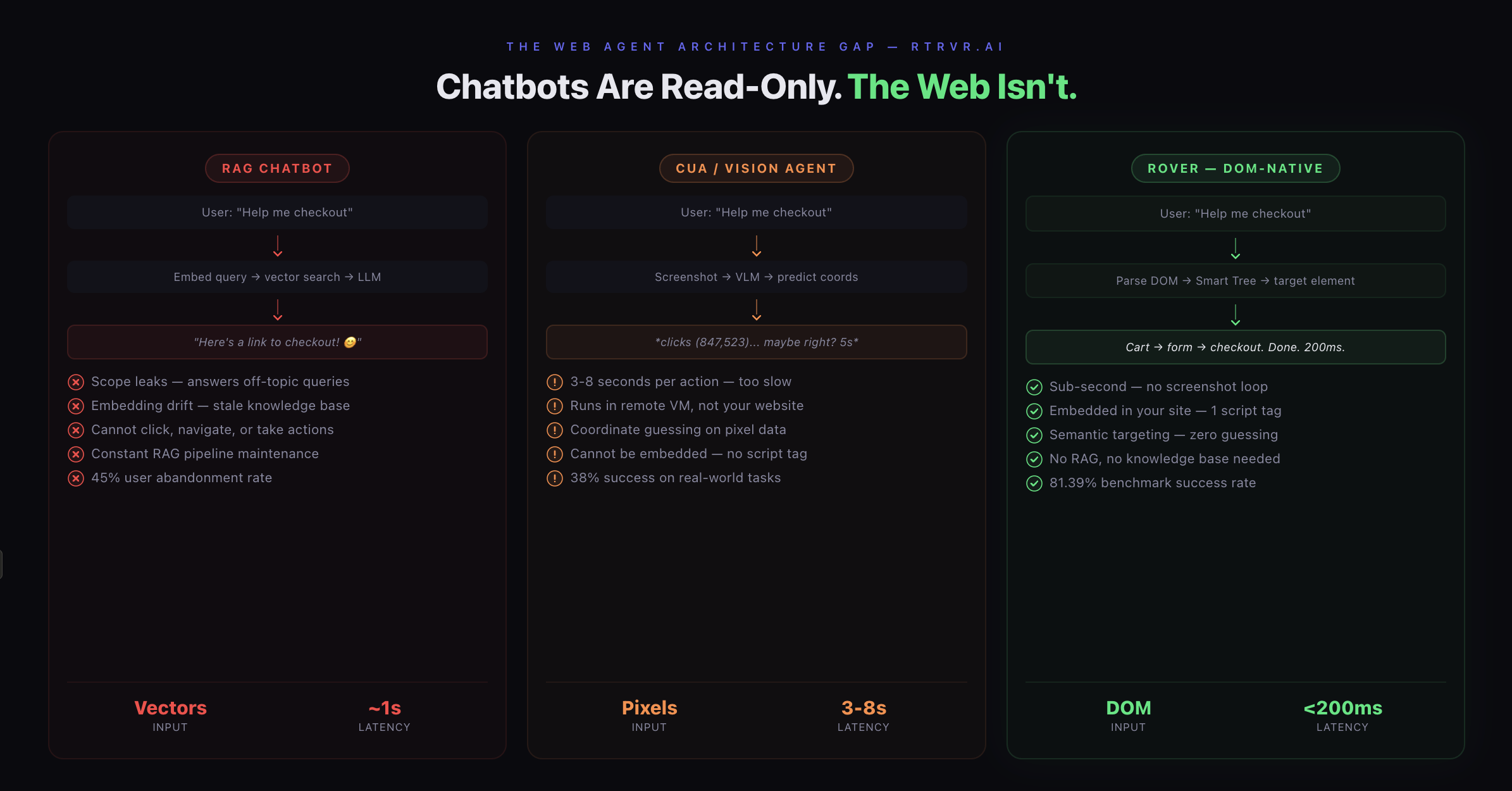
Every chatbot on the internet is architecturally broken. Here's the technical proof — and what comes after.
The Free AI Exploit Nobody Talks About
Here's a party trick: go to any SaaS company's website, open their support chatbot, and ask it to help you write a React component.
It will.
I did this on Stripe's chatbot last week. Asked it for help with React state management and re-renders. It gave me a detailed answer — React.memo, useCallback, useMemo, the works. Helpful, sure. But I was on a payments infrastructure platform. The bot had zero awareness that my question had nothing to do with Stripe. No guardrails. No scope boundaries. Just an eager LLM hooked to an embedding store, generating tokens about whatever you ask.
This isn't a Stripe problem. Stripe is one of the best engineering orgs on the planet. This is a systemic architectural failure that affects every RAG-powered chatbot deployed on every website today.
And it reveals something deeper: the entire paradigm of "chatbot as customer support" is broken at the foundation.
Layer 1: The RAG Trap
Let's talk about the architecture that powers 99% of website chatbots in 2026.
The pipeline: take your docs, knowledge base articles, FAQ pages. Chunk them. Generate vector embeddings. Store them in Pinecone, Weaviate, or whatever vector DB is trending this quarter. When a user asks a question, embed their query, run a similarity search, retrieve the top-k chunks, stuff them into an LLM prompt, generate a response.
This is Retrieval-Augmented Generation. RAG. In theory, it's elegant. In practice, it's a maintenance nightmare disguised as a feature.
THE RAG CHATBOT PIPELINE
========================

  User Query: "Help me checkout"
       │
       ▼
  ┌─────────────┐
  │ Embed Query  │  ← convert to vector
  └──────┬──────┘
         │
         ▼
  ┌─────────────────┐
  │  Vector Search   │  ← similarity match against doc chunks
  │  (Pinecone, etc) │
  └──────┬──────────┘
         │
         ▼
  ┌─────────────────┐
  │ Retrieve Top-K   │  ← hope the right chunks surface
  │ Document Chunks  │
  └──────┬──────────┘
         │
         ▼
  ┌─────────────────┐
  │ Stuff into LLM   │  ← chunks + query → prompt
  │ Generate Response │
  └──────┬──────────┘
         │
         ▼
  ┌─────────────────────────────────────┐
  │ OUTPUT:                             │
  │ "Here's a link to our checkout      │
  │  page! Let me know if you need      │
  │  help 😊"                           │
  └─────────────────────────────────────┘

  Result: User still has to do everything themselves.
The seven failure modes nobody warns you about:
1. Temporal drift. Your product ships a new feature on Tuesday. Your knowledge base still reflects Monday's reality. The chatbot is now confidently lying about your product's capabilities. Embeddings don't auto-update. Someone has to re-chunk, re-embed, re-index. Multiply this across hundreds of doc pages and you've created an entire ops workstream just to keep a chatbot honest.
RAG performance degrades significantly in the face of temporal drift and evolving terminology, and most organizations never build the infrastructure to handle it. Stale embeddings are the silent killer — declining relevance scores for recently updated documents, users reporting outdated information, new terminology not being recognized in search queries. And the fix isn't simple: you need automated re-embedding pipelines triggered by document updates, monthly full-corpus refreshes, and monitoring of embedding age in retrieval logs.
2. Retrieval noise. As vector stores scale to millions of embeddings, similarity search becomes noisy, imprecise, and slow. Your "most relevant" chunks might be thematically adjacent but factually wrong for the specific query. The LLM doesn't know the difference. It generates confidently. The user trusts it. Your support team gets a ticket about a feature that doesn't work the way the bot described.
3. Scope hallucination. This is the Stripe problem. RAG chatbots don't have a concept of "what am I here for." They have a concept of "what's in my vector store, and what can the base LLM already answer." If the query doesn't match anything in retrieval, the LLM falls back to its parametric knowledge — the vast general knowledge baked into the model during training. Which means your payments chatbot will happily discuss React, your e-commerce chatbot will debate philosophy, and your healthcare chatbot will... well, that's where it gets dangerous.
4. Embedding staleness. Documents get updated. Embeddings don't. One academic study mapped seven distinct failure points in RAG systems from real deployments across research, education, and biomedical domains — and embedding-document desynchronization was the root cause of most hallucinations. Knowledge, unlike code, does not naturally converge. It drifts, forks, and accumulates inconsistencies.
5. Chunking artifacts. The way you split documents changes what the model retrieves. Chunk too aggressively and you lose context. Chunk too conservatively and you blow your context window with irrelevant information. There's no universal chunking strategy. It's domain-specific, and it requires constant tuning that nobody budgets for.
6. The evaluation gap. How do you know your chatbot is working? Traditional metrics — resolution rate, deflection rate, CSAT — measure proxies, not truth. Dashboards say "87% positive interactions." Customers are saying the bot is "an annoyance and a hindrance." Only about 20% of users rate chatbot experiences as genuinely acceptable. The gap between what dashboards report and what users experience is where trust goes to die.
7. The maintenance tax. All of the above compounds into an ongoing operational cost that nobody budgets for. Curate the knowledge base. Monitor retrieval quality. Update embeddings. Tune chunking strategies. Evaluate responses. Handle edge cases. You didn't deploy AI support — you deployed a second full-time job.
RAG is a powerful primitive for knowledge retrieval. But using it as the backbone of a customer-facing chatbot — where accuracy has to be 100% and scope has to be airtight — is like using a search engine as a decision engine. Close, but not the same thing.
Layer 2: The Action Gap
Even if you solve RAG perfectly — perfect retrieval, perfect scope, perfect freshness — you still have a fundamental limitation:
Chatbots can only talk. They can't do.
THE ACTION GAP
==============

What the user wants:
  "Help me checkout"  →  Purchase completed ✓

What the chatbot does:
  "Help me checkout"  →  "Here's a link! Good luck! 😊"

What happens next:
  User clicks link → scrolls → finds plan → clicks upgrade →
  enters card info → submits → hopes it works

  That's not "help." That's a redirect with a smiley face.
The entire value proposition of a chatbot is to reduce friction between intent and outcome. But every chatbot on the market stops at the intent layer. They understand what you want (sometimes). They cannot execute it. They can't click the "Add to Cart" button. They can't fill in your shipping address. They can't navigate from the pricing page to the signup form to the onboarding wizard.
The data tells the story: 45% of users abandon chatbot interactions after three failed attempts. Over 65% of chatbot abandonment is attributed to poor escalation — the bot can't do what the user needs, and the handoff to a human is broken. Mobile users experience it even worse — a reported 667% year-over-year increase in rage clicks on mobile interfaces directly correlated with AI chatbot deployment. Your "friction-reducing" chatbot is literally generating physical frustration in your users.
Here's the uncomfortable truth: a chatbot that can answer questions but can't take actions is just a worse version of a search bar.
Layer 3: Why CUA Agents Don't Solve This
"But what about computer-use agents? OpenAI Operator? Anthropic Computer Use? They can take actions!"
Yes. And no.
Computer-Using Agents (CUAs) are one of the most exciting developments in AI. They use vision-language models to look at screenshots, reason about what's on screen, and perform mouse/keyboard actions. OpenAI's CUA combines GPT-4o's vision capabilities with reinforcement learning to interact with GUIs — buttons, menus, text fields — through a perception-reasoning-action loop.
THE CUA AGENT LOOP
===================

  ┌──────────────┐
  │  Take         │
  │  Screenshot   │ ←──────────────────────┐
  └──────┬───────┘                         │
         │                                 │
         ▼                                 │
  ┌──────────────┐                         │
  │  Upload to    │                        │
  │  Vision LLM   │  ~ 1-3 seconds         │
  └──────┬───────┘                         │
         │                                 │
         ▼                                 │
  ┌──────────────┐                         │
  │  Reason about │                        │
  │  next action  │  chain-of-thought      │
  └──────┬───────┘                         │
         │                                 │
         ▼                                 │
  ┌──────────────┐                         │
  │  Predict      │                        │
  │  coordinates  │  (847, 523) maybe?     │
  └──────┬───────┘                         │
         │                                 │
         ▼                                 │
  ┌──────────────┐                         │
  │  Execute      │                        │
  │  mouse click  │ ───────────────────────┘
  └──────────────┘    repeat for every
                      single action

  Time per action: 3-8 seconds
  Time to checkout: minutes
  User patience: already gone
The architecture is genuinely impressive. OpenAI's CUA achieves 38.1% success rate on OSWorld for full computer tasks and 58.1% on WebArena for web-based tasks. State of the art.
But here's why CUAs fundamentally cannot solve the embedded website agent problem:
1. They're slow. Every action requires: capture screenshot → upload to VLM → run inference → parse action → execute → capture next screenshot. That's multiple LLM calls per click. Users expect sub-second interactions on a website. CUAs operate on the order of seconds to minutes per action sequence. You can't embed a 5-second-per-click agent in a checkout flow.
2. They run remotely. CUAs operate in cloud-hosted virtual browsers or VMs. OpenAI's Operator ran entirely in OpenAI's infrastructure before being folded into ChatGPT. Anthropic's Computer Use controls a desktop environment. These aren't running inside your website. They're running on a separate computer looking at your website. You can't give your customers an agent that lives in someone else's cloud and call it a first-party experience.
3. They're imprecise. Vision-based agents struggle with precise element targeting. Date pickers, dropdowns, dynamically rendered components, overlapping elements — all problematic when you're interpreting pixels rather than reading structure. Precise coordinate grounding remains a known challenge — predicting exact positions, handling scrolled content across multiple viewport states, interpreting dense UIs where elements compete for visual attention.
4. They can't be embedded. There's no <script> tag for Operator. You can't drop a CUA into your website's DOM and have it act on behalf of your users. These are standalone products designed for individual users automating their own workflows — not for website owners enhancing their visitors' experience.
5. They hallucinate actions. When a CUA misidentifies a button or clicks the wrong element, there's no structural validation. It's pattern-matching on pixels. A human looking at a screen sometimes clicks the wrong thing. An AI looking at a screenshot does it more often. On a checkout page, one wrong click can mean a failed transaction or an incorrect order.
CUAs are building toward a future of general-purpose computer automation. That's a genuinely different problem than: "How do I help my website visitors complete actions on my site with minimal friction?"
The DOM-Native Thesis
Three broken layers:
- RAG chatbots that talk but can't act, leak scope, and require constant maintenance
- CUA agents that can act but are slow, remote, imprecise, and can't be embedded
- Nothing in between — no product that combines conversational AI with native web actions, running inside your site, reading your page structure directly
This is the gap we built Rover to fill.
THE THREE PARADIGMS — COMPARED
================================

  RAG CHATBOT          CUA / VISION AGENT       ROVER (DOM-NATIVE)
  ───────────          ──────────────────       ──────────────────

  Input:               Input:                   Input:
  Vector embeddings    Screenshots (pixels)     Live DOM tree

  Process:             Process:                 Process:
  Similarity search    VLM inference loop       Semantic parsing
  → LLM generation     → coordinate prediction  → element targeting

  Output:              Output:                  Output:
  Text response        Remote mouse click       Native DOM action

  Latency:             Latency:                 Latency:
  ~1s (retrieval+gen)  ~3-8s per action         <200ms per action

  Can act:             Can act:                 Can act:
  ✗ No                 ~ Slowly, remotely       ✓ Natively, instantly

  Embedded:            Embedded:                Embedded:
  ✓ Widget             ✗ Remote VM              ✓ One <script> tag

  Maintenance:         Maintenance:             Maintenance:
  RAG pipeline + KB    $200/mo + US only        Zero — reads live DOM

  Scope:               Scope:                   Scope:
  Leaks everywhere     Unbounded desktop        Bounded by your DOM

  Benchmark:           Benchmark:               Benchmark:
  N/A                  38.1% (OSWorld)          81.4% (WebBench)
How Rover Actually Works
Rover's architecture is fundamentally different from both chatbots and CUAs. Instead of retrieving from a knowledge base or screenshotting a page, Rover reads the DOM — the Document Object Model — the actual semantic structure of your web page as the browser renders it.
Why does this matter? Because the DOM is the source of truth of any web page. It contains:
- Every interactive element — buttons, forms, links, inputs
- The semantic meaning of content — headings, labels, ARIA attributes
- The current state of the page — what's visible, what's disabled, what's loaded
- The navigation structure — where users can go, what actions are available
- Dynamic content — elements rendered by JavaScript frameworks, SPAs, client-side routing
When Rover reads the DOM, it doesn't need a knowledge base to understand your site. It doesn't need a screenshot to find a button. It reads the structure the same way a browser's accessibility tree exposes it — semantically, hierarchically, in real time.
We represent this as a Smart DOM Tree — a semantically compressed representation of the page that's 10x more token-efficient than a screenshot description. Where a CUA needs to process a 1920×1080 pixel image (millions of tokens of visual information) to understand "there's a blue button that says 'Add to Cart' at coordinates (847, 523)," Rover's DOM representation directly encodes:
<button aria-label="Add to Cart" data-product-id="xyz" enabled>The implications cascade:
ROVER ARCHITECTURE
==================

  User: "Help me checkout"
       │
       ▼
  ┌──────────────────────────────────┐
  │  Parse Live DOM                   │
  │  → Smart DOM Tree                 │
  │  → Semantic structure, not pixels │
  │  → 10x more token-efficient       │
  └──────────────┬───────────────────┘
                 │
                 ▼
  ┌──────────────────────────────────┐
  │  Identify Target Element          │
  │  → By ID, ARIA label, semantic    │
  │  → Not by coordinate guessing     │
  │  → Structural certainty           │
  └──────────────┬───────────────────┘
                 │
                 ▼
  ┌──────────────────────────────────┐
  │  Execute Native DOM Action        │
  │  → Click, fill, navigate          │
  │  → Milliseconds, not seconds      │
  │  → In the user's browser          │
  └──────────────┬───────────────────┘
                 │
                 ▼
  ┌──────────────────────────────────────┐
  │  OUTPUT:                              │
  │  Navigates to cart → selects plan →   │
  │  fills form → completes checkout.     │
  │  Total time: <200ms per action.       │
  └──────────────────────────────────────┘
Sub-second actions. No screenshot loop. No VLM inference per click. Rover reads the DOM, identifies the target element, executes the action. Milliseconds, not minutes.
Native precision. No coordinate guessing. Rover targets elements by their semantic identity — IDs, classes, ARIA labels, text content. It clicks the right button because it knows which button it is, not because it thinks that cluster of pixels looks like a button.
First-party embedding. Rover runs inside your website as an embedded widget. One script tag. It operates in the user's browser, on your domain, within your page context. No remote VM. No data leaving your site.
Zero-maintenance knowledge. Because Rover reads the live DOM, it always reflects the current state of your site. Ship a new feature at 2pm, Rover knows about it at 2:01pm. No re-embedding. No knowledge base sync. No doc drift.
Scoped by design. Rover can only do what your website can do. It can't answer React questions on a payments page because it doesn't have React docs in a vector store — it has your page's DOM. Its capabilities are bounded by your site's actual functionality. Guardrails aren't bolted on; they're architectural.
What This Unlocks
When you combine conversational AI with DOM-native action execution, the interaction model fundamentally changes.
BEFORE (CHATBOT ERA):
=====================
  User:    "I want to buy the pro plan"
  Bot:     "Great choice! Here's a link to our pricing page: [link]"
  User:    *clicks link, scrolls, finds plan, clicks upgrade,
            enters card info, submits, hopes it works*

AFTER (ROVER):
==============
  User:    "I want to buy the pro plan"
  Rover:   "Setting that up now."
           *navigates to pricing → selects Pro → initiates checkout*
  Rover:   "Done — just confirm your payment details."
That's not an incremental improvement. That's a category shift from answering questions about actions to performing actions through conversation.
The use cases compound:
- Prompt-to-checkout — user describes what they want, Rover navigates the entire purchase flow conversationally. 3x conversion lift.
- Interactive onboarding — instead of a 4-minute tutorial video, users say "show me how to set up my first campaign" and Rover walks them through it live, clicking buttons alongside them. 60% faster onboarding.
- Form completion — multi-step forms become conversational. Rover fills fields, validates data, handles conditional logic. 40% less drop-off.
- Cross-page discovery — "find your enterprise pricing and compare plans" triggers Rover to navigate, aggregate, and present. 5x engagement.
- Contextual upsells — Rover understands what the user is looking at and suggests relevant upgrades at the moment of highest intent. 25% higher AOV.
Every one of these is impossible with a RAG chatbot and impractical with a CUA.
The Setup: One Line of Code
<script
  src="https://rover.rtrvr.ai/embed.js?v=SITE_KEY_ID"
  async
  data-site-id="SITE_ID"
  data-public-key="pk_site_..."
  data-site-key-id="SITE_KEY_ID"></script>
That's the shape of the integration. Workspace generates the exact script tag for your site. No knowledge base to build. No RAG pipeline to maintain. No embedding models to choose. No vector databases to provision.
Rover reads your site. Understands it. Acts on it.
The Competitive Moat You're Ignoring
2026 will be the year websites stop talking at users and start acting for them.
The chatbot market is projected to grow to $46 billion by 2029. But the product category itself is stagnating. More money is being poured into fundamentally the same architecture — RAG + LLM + chat widget — that has the same failure modes it had two years ago. The industry is optimizing a local maximum.
Meanwhile, the companies that embed an action-capable web agent first will see compounding advantages:
- Higher conversion — removing navigation friction directly increases checkout completion
- Faster onboarding — users who get guided through features adopt more features
- Lower support costs — agents that resolve by doing deflect harder than agents that resolve by talking
- Stickier products — an AI agent that works with you inside an app creates switching costs no FAQ bot ever will
If your competitor embeds Rover and you're still running a chatbot that answers React questions on a payments page — you're not losing a feature comparison. You're losing customers to a fundamentally better experience.
The Web Isn't a Document. Stop Treating It Like One.
RAG was built for documents. CUAs were built for desktops. Neither was built for the web as it actually exists — a dynamic, interactive, stateful application layer that users navigate with intent.
The web has a native representation of itself. It's called the DOM. Every interactive element, every navigation path, every dynamic state change is encoded there. We've spent years building chatbots that ignore this structure and convert web content into static text chunks in vector databases. Then we built vision agents that ignore this structure and take screenshots of it.
Rover doesn't ignore the DOM. Rover is the DOM — parsed, understood, and acted upon in real time.
We built this at rtrvr.ai. Our DOM-native architecture achieves 81.4% success rates on industry web automation benchmarks — compared to 40-66% from vision-based and CDP-based competitors. We've processed 212,000+ workflows for 15,000+ users. And now we're bringing this architecture to every website on the internet through Rover.
The web is about to get a lot more intelligent. Not because of better LLMs or bigger context windows or fancier RAG pipelines.
Because someone finally decided to read the page.
Rover is in early access. One line of code. Zero excuses.
Built by two ex-Google engineers who got tired of chatbots that can't click a button.