
 Add to Chrome
Agentic Dataset Enrichment demo
Watch Retriever research 500 attendees and contact the top 10.
You came back from the conference with 500 names. An attendee list you can open in a tab — and not much else.
You know what happens to those names today. Either it's 10–15 minutes each on LinkedIn, tab by tab, until you give up somewhere around forty. Or it's the export route: scrape to CSV, upload to an enrichment tool, map columns, buy a credit bundle, and pay for every lookup that comes back empty. By the time the outreach goes out, the event is cold.
We shipped something different: agentic dataset enrichment, running right in your browser — on the pages you're already logged into.
The demo
You're looking at 500 guests on a Luma event page — a list that only exists behind your login, on a page server-side enrichment tools will never see. You tell Retriever:
Enrich these guests with LinkedIn profiles and work emails,
score them against my ICP, and reach out to the top 10.
Retriever pulls all 500 guests off the page, matches them against preindexed people, company, and contact datasets, fills in LinkedIn profiles and work emails, scores everyone for fit, and sends connection requests plus emails to the top 10.
500 attendees researched. Top 10 contacted. One prompt.
No export. No column mapping. No spreadsheet cleanup. Matched records stream into a Google Sheet as they land, and every message can mention the event you were both at.
What changed
Retriever could already research a prospect the way you do it — open the profile, read it, move on. That's why prospecting eats a week.
Now it looks up hundreds of people and companies in one shot against preindexed datasets, and searches the live web only for what's still missing. Under the hood, Retriever writes a JavaScript enrichment plan against the rtrvr.* harness, shows you the estimated cost, and — after you approve — executes it in a sandbox in your extension.
It isn't picking from someone's prebuilt waterfall template. It writes your waterfall, for this list, this request, this page — and you can read every line it runs.
The mechanics
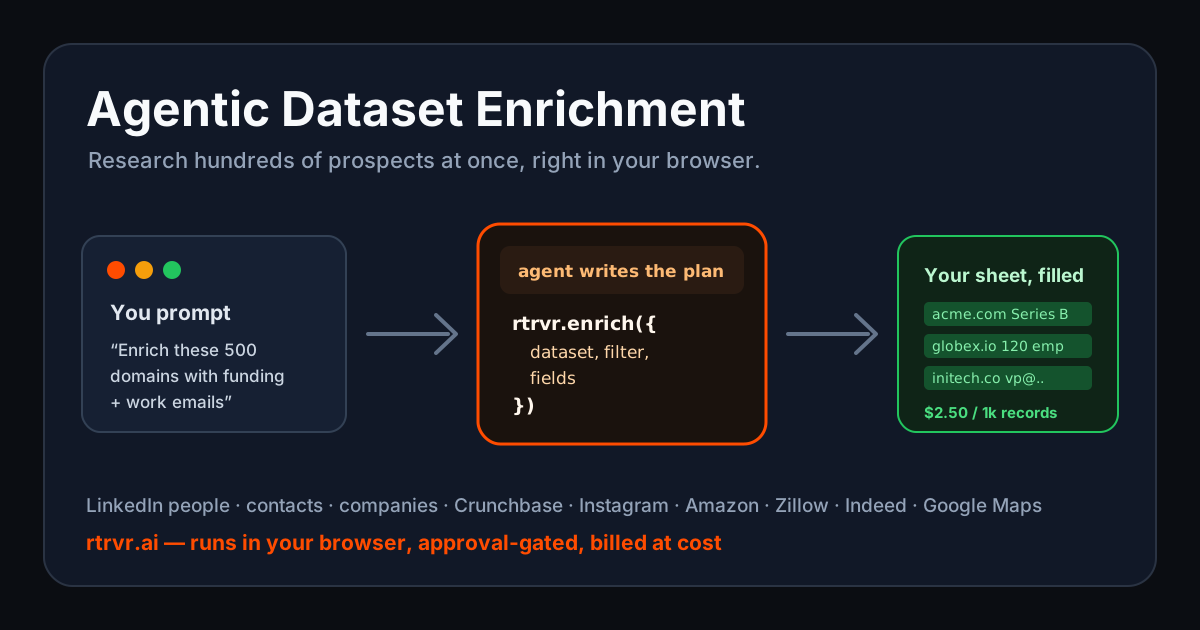
For the GTM engineers: this is the actual program it writes. The new harness helper, rtrvr.enrich, is wired into our code-as-plan architecture and backed by Bright Data's dataset marketplace:
- Instant lookup — filterable queries over the LinkedIn people, LinkedIn contact-enriched (work emails / phones), and LinkedIn company datasets. The agent composes typed filters (
=,in,includes, nestedand/orgroups) from your plain-English ask. - Live scrape — fresh scrape-by-URL for Crunchbase, Instagram, Amazon, Zillow, Indeed, and Google Maps, up to 20 URLs per call.
- Free discovery — listing datasets and inspecting their field schemas costs nothing, so the agent explores before it spends.
The part that matters: everything around the paid lookup is deterministic code, not model turns. Key extraction, batching, retries, joins, dedup, projection — a for-loop should not cost tokens, and here it doesn't:
// Build lookup keys from your sheet rows — the LinkedIn profile slug, not the URL.
const ids = rows
  .map(r => r.linkedinUrl?.split('/in/')[1]?.split(/[/?#]/)[0].toLowerCase())
  .filter(Boolean);

// Estimate cost and get explicit approval before any paid call.
const estCredits = Math.ceil(ids.length * 0.25);
const { answers } = await rtrvr.askUser({
  questions: [{
    key: 'enrichApproval',
    query: `Enrich ${ids.length} LinkedIn profiles for ~${estCredits} credits?`,
    choices: ['Yes', 'No'],
  }],
});
if (answers.enrichApproval !== 'Yes') return { summary: 'Enrichment declined.' };

// One instant lookup — batching against the dataset API happens server-side.
const { records } = await rtrvr.enrich({
  dataset: rtrvr.datasets.linkedinPeople,
  filter: { name: 'id', operator: 'in', value: ids },
  fields: ['name', 'position', 'current_company', 'city'],
});
That is the code the agent generates and runs. You didn't write it, but you can audit it, edit it, save it, and replay it on next month's attendee list without paying for a single planning token again.
Long jobs don't hold your browser hostage
A heavy scrape (20 Zillow listings, a batch of Crunchbase profiles) can outrun the provider's sync window. When that happens the call comes back instantly as { pending: true, snapshotId } — having billed nothing — and the plan keeps doing other free work while the job finishes:
let { records, pending, snapshotId } = await rtrvr.enrich({
  dataset: rtrvr.datasets.zillowProperties,
  scrapeUrls: listingUrls,
  fields: ['zpid', 'address', 'price', 'bedrooms'],
});

if (pending) {
  ({ records } = await rtrvr.enrich({ collect: snapshotId, fields: ['zpid', 'address', 'price', 'bedrooms'] }));
}
Records are billed at exactly one place in the pipeline, so the inline and deferred paths can never double-charge — and a finished job never hands back a collectable handle again.
Pay per record, not per seat
The enrichment SaaS markup pays for the dashboard, the template gallery, and the sales team. When an agent writes the pipeline on demand, none of that needs to exist:
- Instant lookup: 0.25 credits per matched record ($2.50 per 1,000). Zero matches, zero cost.
- Live scrape: 0.15 credits per successful record ($1.50 per 1,000). Failed inputs are free.
- Discovery: free. Pending jobs: free until collected.
No seats. No monthly credit bundle. No minimums. 1 credit = $0.01, passed through at cost, and every paid call is estimated and approved inside the task before it runs. Researching that entire 500-person attendee list costs about $1.25.
Why the browser is the right place for this
Every other enrichment tool lives server-side, cut off from the pages where your prospects actually are. A browser agent isn't:
- Your logins are the access. The Luma guest list, the Sales Nav search, the member directory — enrich the page you have open. No export/import loop.
- Verification is one hop away. A dataset record is a claim; your agent can open the source page and check it, with your logins, before it writes a row.
- Fallbacks compose on the fly. Missing an email after the lookup? The same plan chains
rtrvr.webSearch(0.15 credits a query) and live page extraction as the next tier — a waterfall written per run, not a fixed template.
Call it Clay for the lists behind your logins — running where your access already lives. And when you'd rather close the laptop, the same run works in a Retriever cloud browser.
Retriever Enrich is live now in the extension — enable it under Settings → Labs, open an attendee list or a sheet, and ask. Full dataset list, filter syntax, and pricing in the docs.


